What is on the page
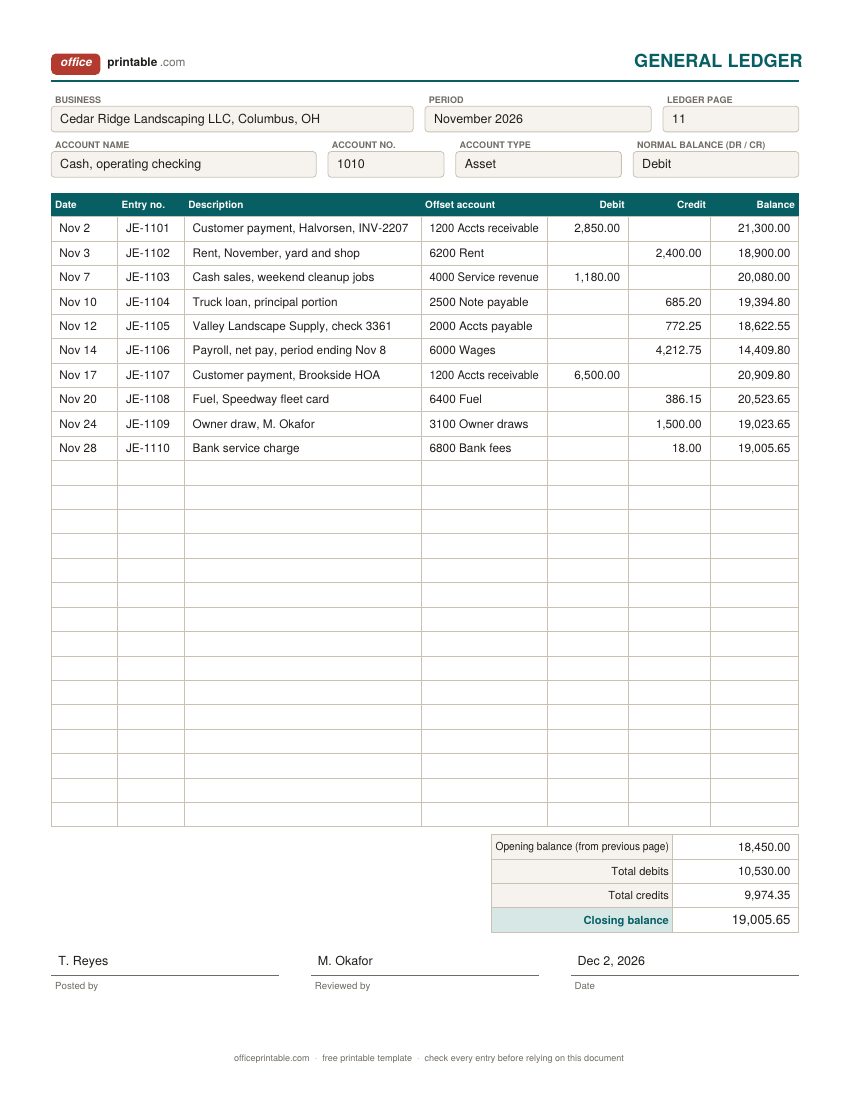
- Account name and number
- Taken from your chart of accounts, for example 1010 Cash or 6200 Rent. Each general ledger page covers one account only, so the number goes at the top and stays the same for every line.
- Account type and normal balance
- Assets and expenses normally carry a debit balance. Liabilities, equity and revenue normally carry a credit balance. Writing it in the header stops anyone misreading a balance later.
- Entry no. and reference
- The journal entry number, invoice number, check number or credit memo number that the line came from. This is your audit trail back to the source document.
- Offset account
- The other side of the entry. If cash went up because a customer paid, the offset is accounts receivable. It lets you trace any line on one page to the matching line on another.
- Debit and credit
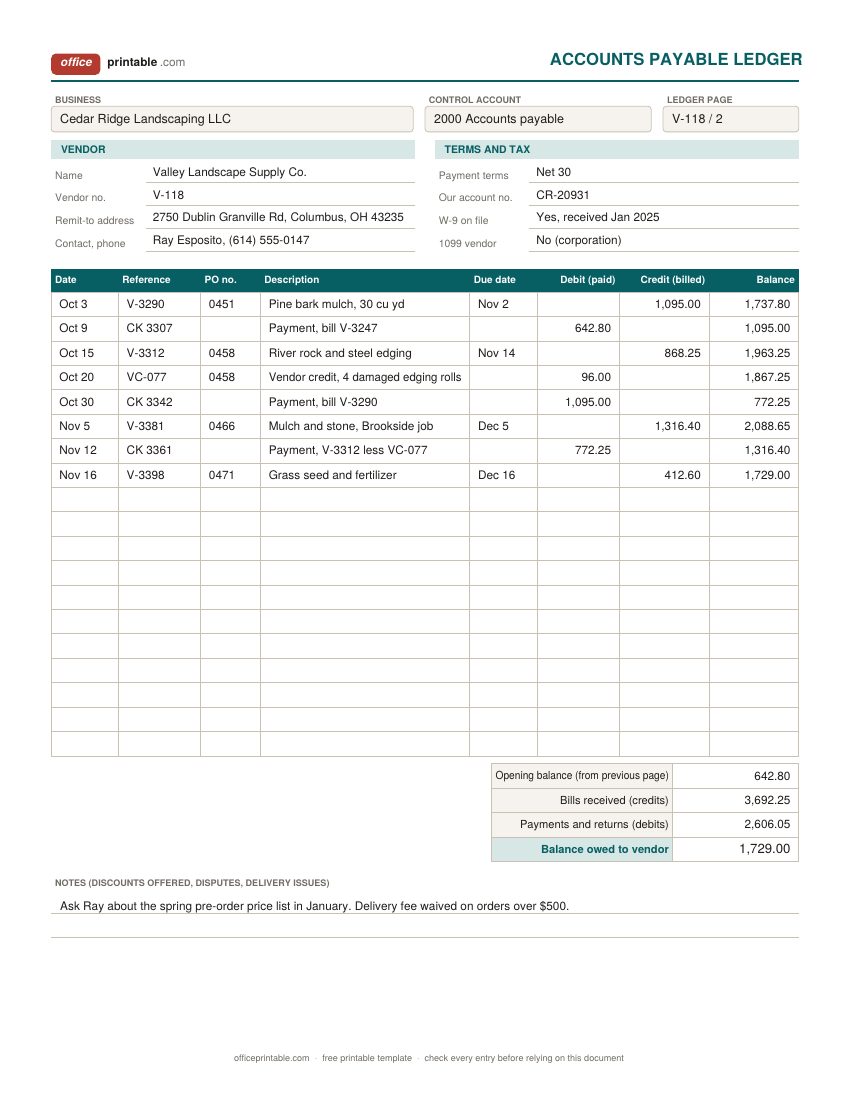
- Each amount goes in one column only. On the general ledger and the receivable ledger, debits raise the balance. On the payable ledger, credits (new bills) raise the balance and debits (payments) lower it.
- Running balance
- The balance after each line. In Excel it is a formula built from the opening balance; on paper, work it out as you post and check it against the closing balance at the bottom.
- Control account
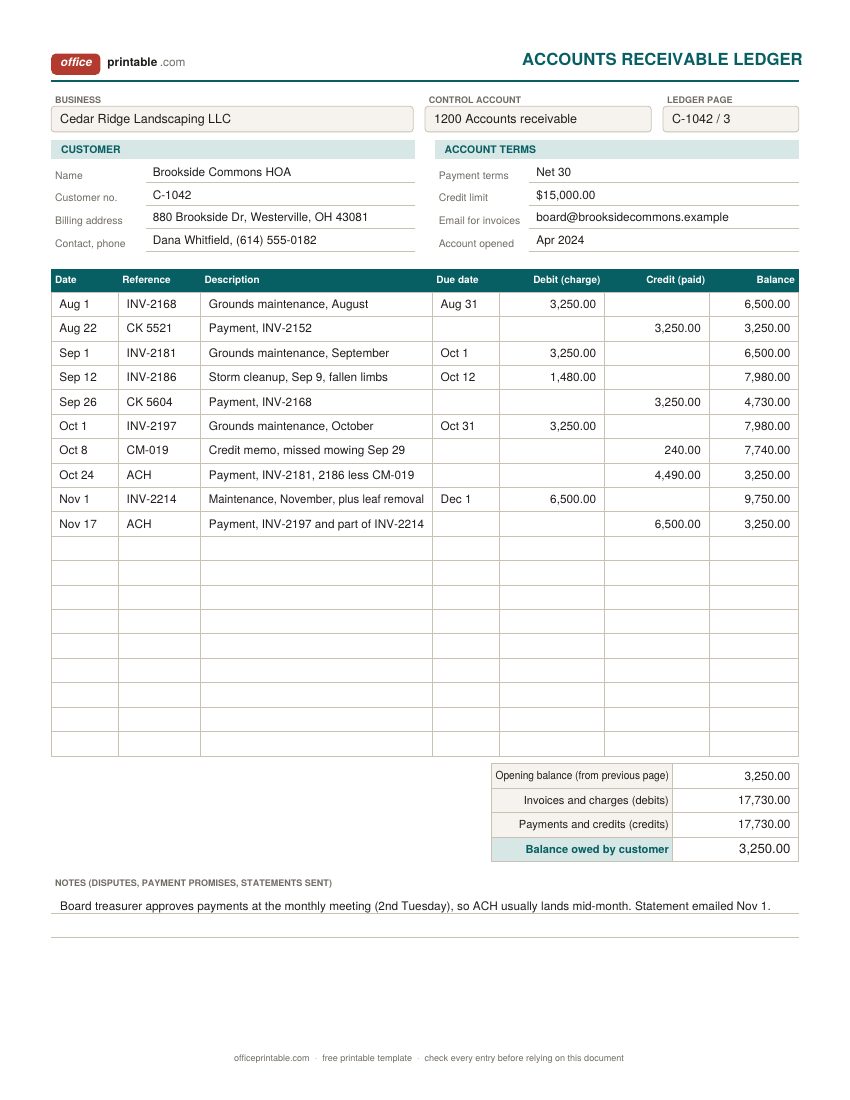
- On the customer and vendor pages, the general ledger account their totals roll up into: accounts receivable or accounts payable.
- Terms, credit limit, W-9 and 1099
- The account details you look up most. Payment terms set the due date; the credit limit tells you when to stop extending credit; the W-9 and 1099 boxes save a scramble in January.
How an accounting ledger works
Bookkeeping has two main records. The journal lists transactions in date order as they happen. The ledger takes the same entries and sorts them by account, so you can see everything that hit cash, or rent, or a single customer, on one page with a balance. When people say "the books," the ledger is usually what they mean.
In double-entry bookkeeping every transaction touches at least two accounts, and the debits always equal the credits. Pay $2,400 rent by check and rent expense gets a $2,400 debit while cash gets a $2,400 credit. Debit and credit only mean left and right; whether a debit raises or lowers a balance depends on the account. Debits increase assets and expenses. Credits increase liabilities, owner's equity and revenue. That is why the general ledger sheet asks for the normal balance in the header.
Because every entry has two equal sides, the total of all debit balances across your ledger should equal the total of all credit balances. Listing them side by side is called a trial balance, and it's the quickest way to catch a posting mistake before you prepare a profit and loss statement or a balance sheet.
General ledger template: one page per account
Use a seperate general ledger page for each account you track. A small service business might have 25 to 40 accounts: cash, accounts receivable, equipment, accounts payable, a loan, owner's equity and draws, a few revenue lines and the usual expenses. Number them the common way (1000s assets, 2000s liabilities, 3000s equity, 4000s revenue, 5000s and 6000s costs and expenses) and keep one page or one Excel tab for each.
The sample page shows a cash account for November. Every line names its entry number and the offset account, so the $772.25 credit on Nov 12 can be traced straight to the vendor page, where the same check reduces what the business owes. The closing balance should match the bank statement after you allow for outstanding checks and deposits in transit; if you keep a check register, that is where the matching starts.
Accounts receivable ledger and accounts payable ledger
With more than a handful of customers, a single accounts receivable account in the general ledger stops being useful on its own. It tells you the total owed but not who owes it. The fix is a subsidiary ledger: one page per customer, each with its own running balance. Add up the closing balances of every customer page and the total should equal the accounts receivable control account in the general ledger. If it does not, something was posted in one place and missed in the other.
The accounts payable ledger works the same way for vendors, with the columns reversed in meaning. A bill from a supplier is a credit that raises what you owe; a payment or a vendor credit is a debit that lowers it. Recording the PO number on each bill makes it easy to match the bill to what was ordered and received before you pay it.
These ledgers are different from the client billing tracker which is an invoice log with paid or late status and an aging report. Use the tracker to chase payments. Use the receivable ledger when you want a proper account history per customer that ties back to your books.
How to post to the ledger each month
- Collect the month's source documents: sales invoices, customer payments, vendor bills, checks written, bank and card statements, payroll reports.
- Record each transaction in date order with its debit and credit accounts. A simple journal can be a column on your bank statement printout or a spreadsheet tab.
- Post each entry to the ledger pages for both accounts. Customer invoices and payments also go on that customer's receivable page; vendor bills and payments on the vendor's payable page.
- Update the running balance on each page as you go. On paper, pencil it in and check it at the bottom against opening balance plus debits minus credits.
- At month end, total the debits and credits on every page, carry the closing balance to the next page as its opening balance, and list all closing balances in a trial balance.
- Compare the customer pages with the receivable control account and the vendor pages with the payable control account. Investigate any difference before you start the next month.
Ledger, check register or expense tracker?
Small businesses often keep a few simpler records alongside the ledger, and each has its own job. A petty cash log covers the cash box and its vouchers; the monthly replenishment is what gets posted to the ledger. The business expense tracker sorts spending by Schedule C category for tax time, which suits a sole proprietor who doesn't keep full double-entry books. An invoice is the source document behind each debit on a customer page. If you only need to know what clients owe and how late they are, the billing tracker is enough. If you want books that balance and can be handed to an accountant or a lender, the accounting ledger is the record they will ask for.
Using the Excel ledger template
In the Excel and ODS files, type the opening balance in the totals box first. Each balance cell adds the previous balance to that line's debit and subtracts its credit (the payable ledger does the reverse), and a row left blank simply carries the balance forward. The totals box sums both columns and works out the closing balance independently, so if the last running balance and the closing balance ever disagree, a cell has been overwritten. Insert rows inside the table to add lines. For a credit-normal account such as revenue or a loan on the general ledger sheet, read a negative balance as a credit balance, or swap the debit and credit in the balance formula for that tab.
The fillable PDF doesn't calculate. It's meant for typing entries and printing, or for posting by hand the old way with a pen.
How long to keep ledger records
The IRS says to keep records that support a tax return for at least three years in most cases. Longer periods apply in some situations: four years for employment tax records, six years if income was underreported by more than 25%, and seven years if you claim a bad debt deduction. Many businesses simply keep ledgers and their source documents for seven years. Your state may have its own rules, so check with your accountant or the IRS page on record keeping before you shred anything.
Questions
What is the difference between a general ledger and a general journal?
The journal records each transaction in date order with both its debit and credit. The general ledger takes those same entries and groups them by account, with a running balance. You record in the journal first, then post to the ledger.
Do I need a separate ledger page for every customer?
Only for customers who buy on credit. Cash and card sales that are paid at once never create a receivable, so they go straight to cash and revenue in the general ledger.
Why does the payable ledger add credits and subtract debits?
Accounts payable is a liability, and liabilities have a normal credit balance. A new bill is a credit that increases what you owe; a payment is a debit that reduces it. The receivable ledger is the opposite because receivables are an asset.
How do I fix a mistake in a ledger?
Don't erase or overwrite a posted line. Record a correcting entry with its own date and reference that reverses the wrong amount, then post the right one. On paper, a single line through an error with your initials is also accepted practice.
Which vendors need a 1099?
Generally unincorporated vendors you pay for services, such as sole proprietors and most LLCs. For payments made in 2026 the reporting threshold for Form 1099-NEC is $2,000, up from $600. Rules have exceptions, so check the current IRS instructions or ask your tax preparer.
Can this replace accounting software?
For a very small business with a few dozen transactions a month, a ledger kept in Excel or on paper works fine. When customers multiply, or inventory and payroll come in, software saves time because it posts every entry to both sides at once. Many owners still print ledger pages for a monthly review.
Comments and questions
Have a question about this template, or an idea to make it better? Leave a comment.
Leave a comment