What is on the page
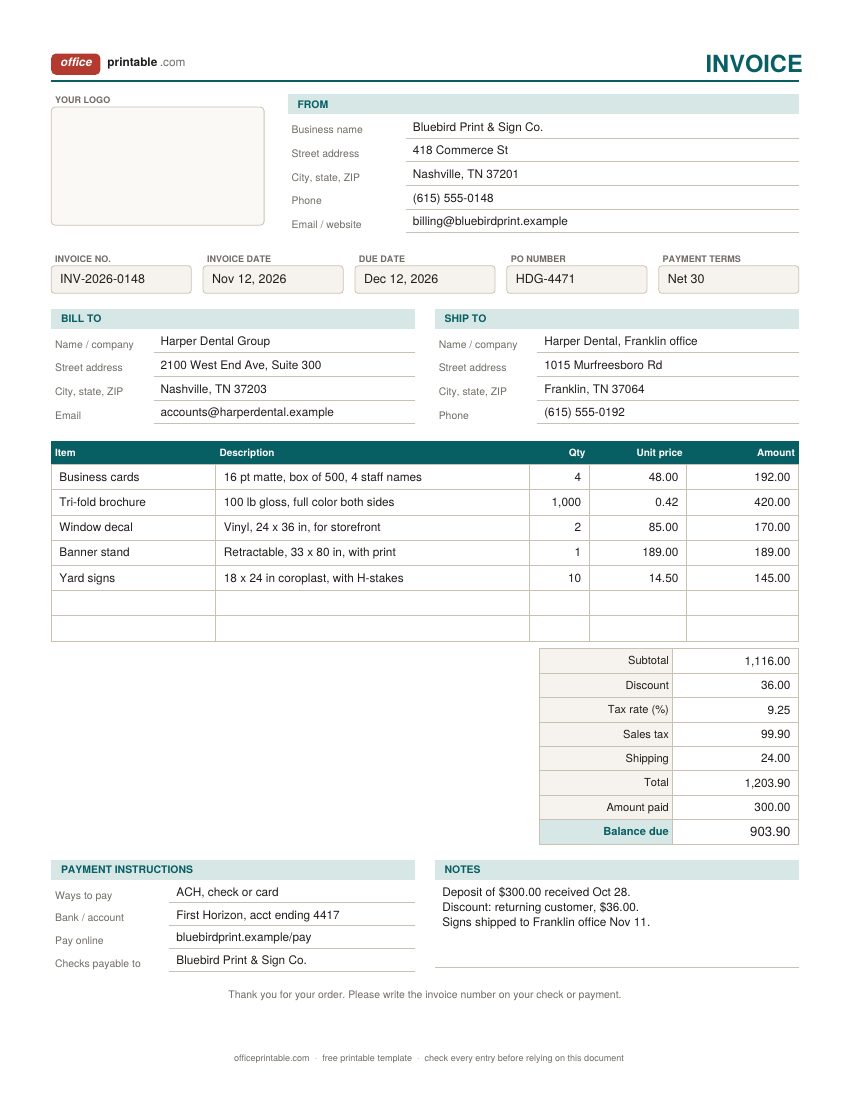
- Your logo and From block
- Your business name as it appears on your bank account, then street address, phone and email. Customers pay the name they see here, so it should match the payee on your bank account.
- Invoice number
- A unique number for every invoice you send. Never reuse one, even after a canceled order.
- Invoice date and due date
- The day you issue the invoice and the day the money is due. Write the real date (Dec 12, 2026), not only the term.
- PO number
- The purchase order number your customer gave you. Many accounts payable teams will not release payment without it.
- Bill to and ship to
- Who pays and where the goods went. They are often different for companies with several offices or a central billing address.
- Line items
- What you sold, how many, the unit price and the line amount. The itemized design adds an item number, unit, and ordered vs shipped quantities.
- Discount, tax and shipping
- Discount comes off before sales tax. Shipping is added on its own line so the customer can see it.
- Amount paid and balance due
- Deposits or partial payments already received, and what is left to pay. The balance is the number your customer acts on.
- Payment instructions
- How you accept money and where to send it. A missing payment method is one of the most common reasons an invoice sits unpaid.
How to fill out this invoice template
- Set up your details once. Put your logo, business name, address and contact details in the From block, add your usual payment instructions, and save the file as your master copy.
- Give the invoice its number. Take the next number in your series and enter today's date.
- Work out the due date. For Net 30, count 30 days from the invoice date and write that date in the due date box.
- Add the customer. Copy the billing name and address exactly as the customer uses it, and fill in ship-to if the goods went somewhere else. Add the PO number if they sent one.
- List what you sold. One line per product or service, with quantity and unit price. Use the same wording as the quote or estimate the customer approved, so nothing looks new to them.
- Finish the totals. Enter any discount, the sales tax rate if you charge tax, shipping, and any deposit already paid.
- Check and send. Save as PDF with the invoice number in the file name (INV-2026-0148.pdf), email it, and keep a copy with your records.
Which invoice design to use
The standard business invoice fits most sales of goods, and mixed jobs where you supply parts and some labor. It has room for a ship-to address, a PO number, a discount and a deposit which is what business customers tend to ask for.
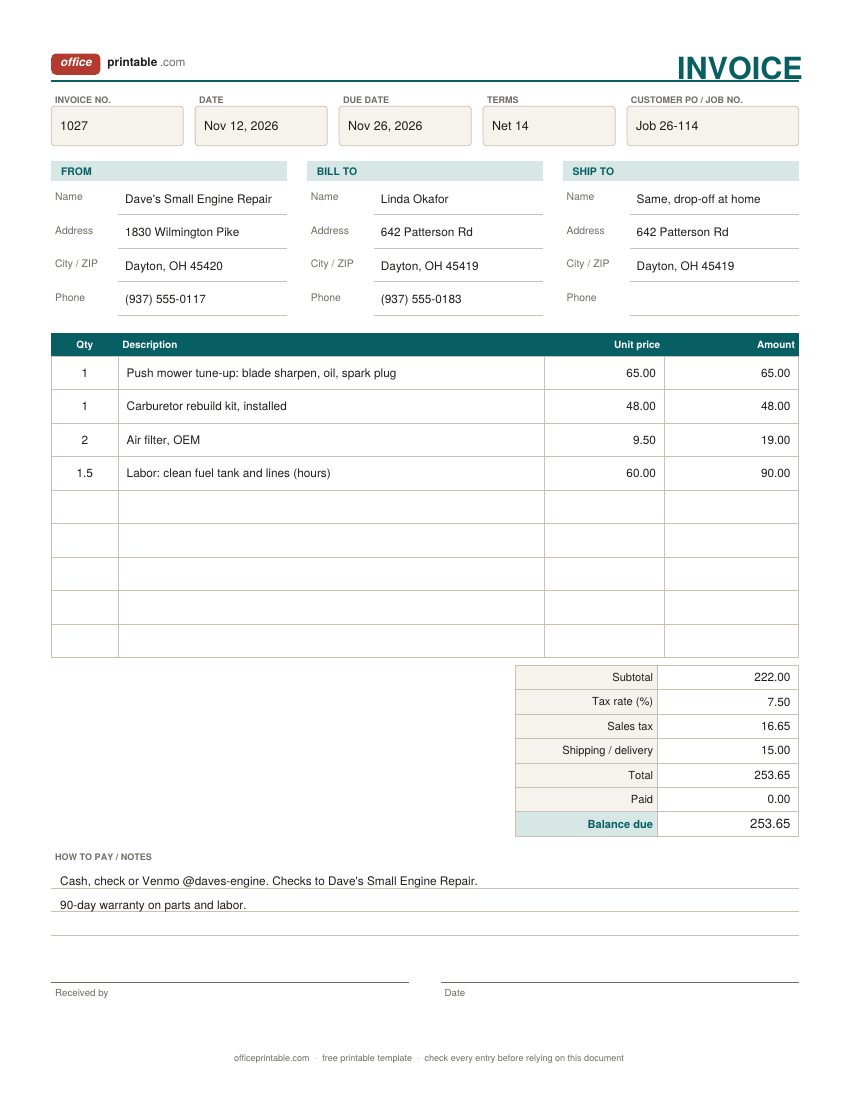
The blank invoice is for people who write invoices on site: mobile mechanics, handymen, market stall sellers, mobile pet groomers. The boxes are bigger, the rows are taller, and it photocopies cleanly. Hand the customer the original and keep a photo or a carbon copy for yourself.
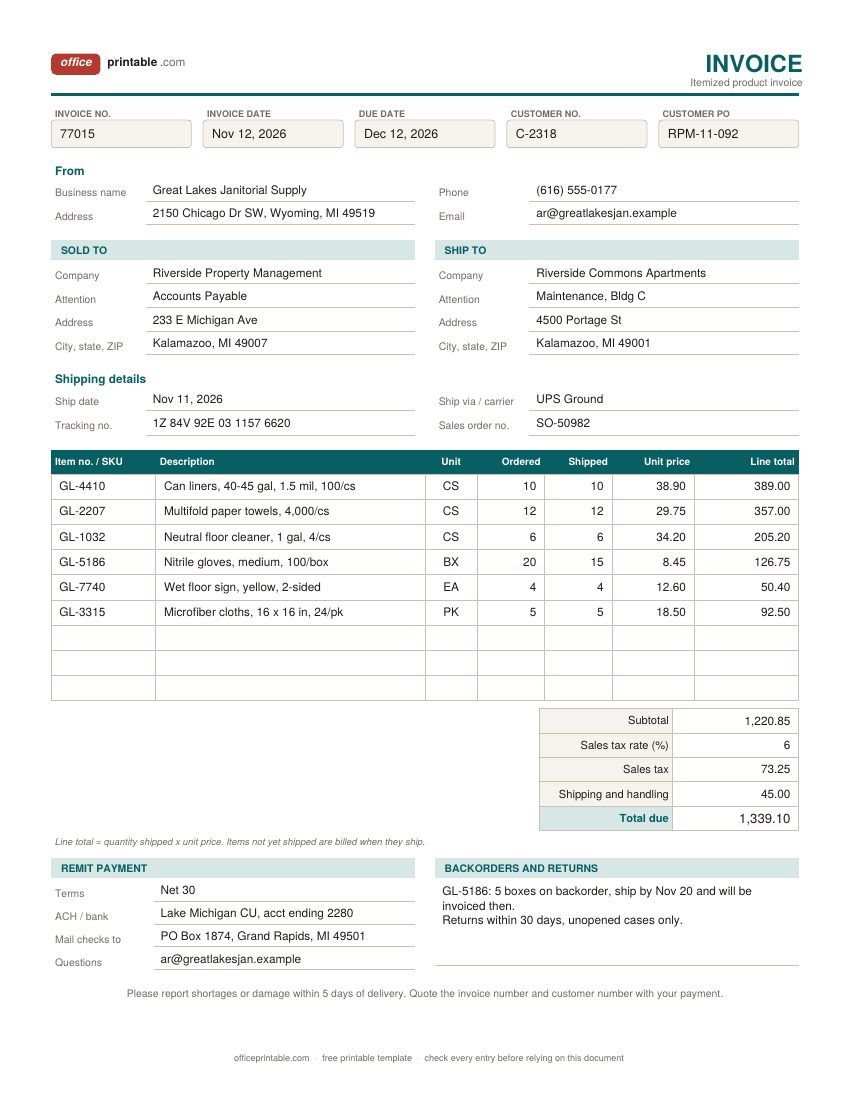
The itemized product invoice suits wholesale, distribution and online orders. Each line carries a SKU and shows how many units were ordered against how many actually shipped, so a partial shipment doesn't turn into a dispute. Pair it with a packing slip in the box.
If you only bill for your time, a time-based invoice may be a better fit. Look at the service invoice, the freelance invoice, or the contractor invoice for construction work. For a very short invoice with no shipping or SKUs, the simple invoice is enough.
How to number your invoices
Pick one format and stick to it. Plain sequential numbers (1001, 1002, 1003) work fine. A year prefix such as INV-2026-0148 makes it easy to find old invoices and starts a fresh count each January. Some businesses add a customer code (HDG-0148), which helps if you look things up by client.
Whatever you choose, every number should be used once. If you void an invoice, keep it marked VOID rather than deleting it, and correct a mistake on a sent invoice with a credit note instead of quietly changing the original. That clean trail makes year-end bookkeeping, and any question from a tax authority, much easier to answer.
Payment terms: Net 30, Net 15 and due on receipt
Payment terms tell the customer how long they have. The common ones:
- Due on receipt: pay now. Normal for one-off jobs, retail customers and small amounts.
- Net 15 or Net 30: due 15 or 30 days after the invoice date. Net 30 is the usual expectation of larger companies.
- 2/10 Net 30: the customer can take 2% off if they pay within 10 days, otherwise the full amount is due in 30.
- EOM: due at the end of the month the invoice is dated in.
Agree terms before the work starts, print them on every invoice, and always add the actual due date as well. If you plan to charge a late fee, say so up front, both in your agreement and on the invoice. Some states limit late fees and interest, so check the rules where you do business before you set a rate. When a due date passes, send a polite payment reminder first and keep the overdue invoice letter for later.
Sales tax on an invoice: the basics
There is no federal sales tax in the US. Sales tax is set by states, and in many places by counties and cities too, so the right rate depends on where the sale happens or where the goods are delivered. Most states have a statewide sales tax; a handful do not. Whether services, shipping charges or labor are taxable also varies from state to state.
What the invoice needs is simple: show the tax as a separate line, show the rate you used, and apply it to the right amount. In many states a discount you give at the time of sale lowers the taxable amount, which is why the discount line sits above tax on these invoices. If a business customer buys for resale or is tax exempt, they will usually give you a certificate to keep on file. The rules here are general facts only, not tax advice. Check with your state's revenue department or a tax professional for your own case.
Invoice vs receipt vs estimate
These documents follow each other. An estimate or quote comes before the work and says what it will probably cost. The invoice comes after delivery and asks for payment. A receipt comes last and confirms the money arrived. If a customer buys on the spot and pays at once, a receipt alone is often enough. When they pay later, send an invoice, then a receipt when the payment clears. Business customers may send you a purchase order first; put its number on your invoice.
Using the Word and Excel invoice templates
The invoice template in Excel does the math for you. Line amounts multiply quantity by unit price, and the subtotal, sales tax, total and balance due all update when you change a line. On the itemized design the line total uses the quantity shipped. The download comes empty, so type your own lines into the blank rows and leave the formula cells in the Amount column untouched. To add rows, insert them inside the table so the totals still pick them up.
The invoice template in Word is better if you want to change the layout or wording. To add your logo, click into the logo box and insert your image. Word won't calculate, so do the sums on a calculator or in the Excel file. The fillable PDF invoice lets you type in every box in Adobe Reader or a browser and save, but the totals aren't calculated there either. The ODT and ODS files open in LibreOffice and Google Docs or Sheets.
Mistakes that slow down payment
- No due date, or only "Net 30" with no date next to it.
- The customer's PO number is missing, so the invoice gets parked in their system.
- Lines like "Services" or "Materials" with no detail. The customer has to ask, and asking takes a week.
- A business name on the invoice that doesn't match the payee on your bank account.
- Billing for goods that haven't shipped yet. Bill what shipped and note the backorder.
- Sending the invoice weeks after the job. The sooner it goes out, the sooner the clock starts.
Questions
Is this invoice template really free?
Yes. Download any design in any format and use it for your business, as often as you like. There's no sign-up and no watermark on the form.
Can I add my own logo?
Yes. In Word, click into the logo box at the top of the standard invoice and insert your image. In Excel, use Insert > Pictures and place it over the logo cell. The PDF has a logo box you can leave empty or write your name in.
Does the PDF calculate the totals?
No, the fillable PDF holds what you type but doesn't add it up. Use the Excel version for working totals, then save or print it as a PDF to send.
What should a basic invoice include?
At least the word "Invoice", a unique number, the invoice date, your business name and contact details, the customer's name and address, what you sold with quantities and prices, the total, the due date and how to pay. Show sales tax on its own line if you charge it.
How long should I keep copies of invoices?
The IRS generally asks businesses to keep records that support their income for at least three years, and longer in some cases. Many owners simply keep invoices for seven years to be safe.
Can I print a blank invoice and fill it in by hand?
Yes, that is what the blank design is for. Print it on plain Letter paper, fill it in with a pen, and give the customer the original. Keep a photo or photocopy for your records.
Comments and questions
Have a question about this template, or an idea to make it better? Leave a comment.
Leave a comment