What is on the page
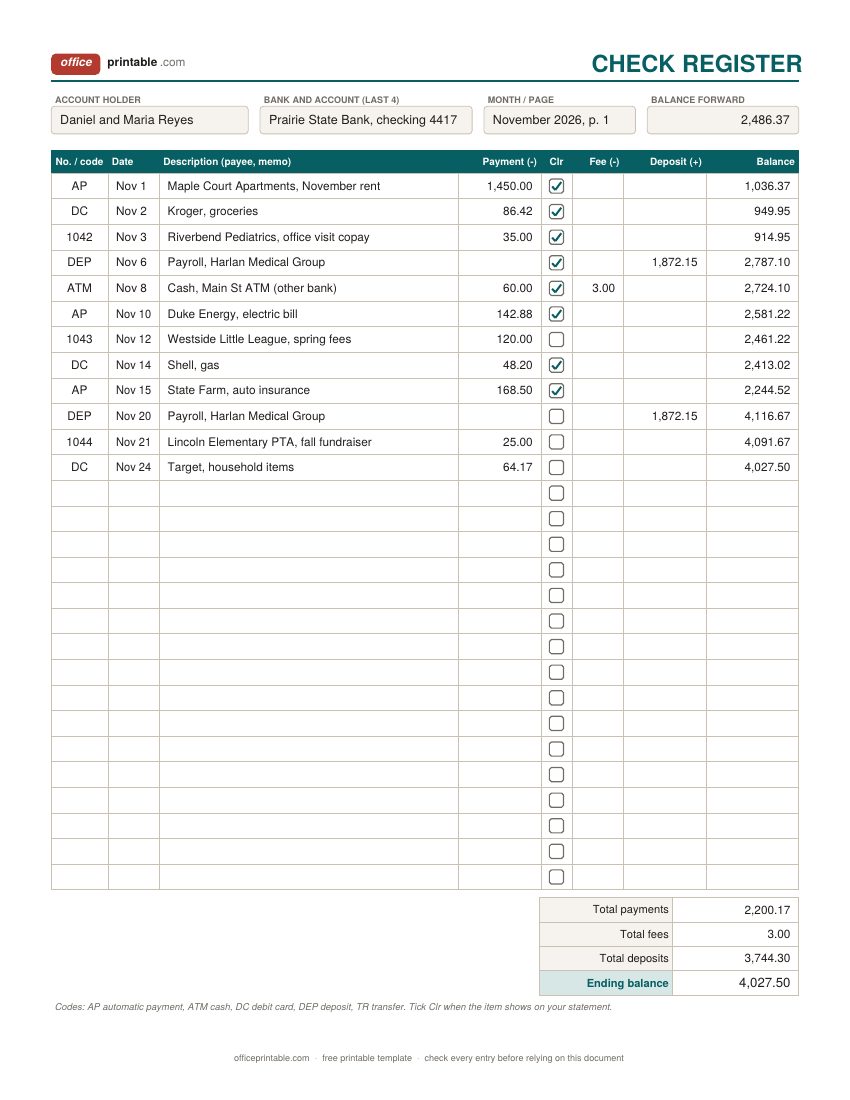
- Check number or code
- The check number for paper checks. For everything else use a short code: DC for a debit card purchase, ATM for cash, AP for an automatic payment, DEP for a deposit, TR for a transfer between your own accounts.
- Date
- The day you wrote the check or made the payment, not the day it clears. That gap is exactly what the register is for.
- Description
- Who you paid or where the money came from, plus a few words of memo. "Duke Energy, October bill" is easier to match to a statement than "electric".
- Payment, fee, deposit
- Money out goes in Payment, money in goes in Deposit. Bank fees, such as the charge for using another bank's ATM, get their own column so they are easy to total at the end of the month.
- Clr (cleared)
- Tick it when the item shows up on your bank statement or in online banking. Anything left unticked at reconciliation time is still outstanding.
- Balance
- Your balance after each line: the previous balance plus deposits, minus payments and fees. The Excel check register does this for you; on paper, write it every time.
- Balance forward
- The balance you carry from the bottom of one page or strip to the top of the next.
How to use a check register
- Start with today's balance. Look up the current balance in online banking, subtract any checks you know have not cleared yet, and write the result as your balance forward.
- Write every transaction the day it happens. Checks, debit card purchases, ATM cash, automatic payments, transfers, deposits. Keep receipts in your wallet till they are written down.
- Work out the new balance on the same line. Add deposits, subtract payments and fees. If you use the Excel file, just type the amounts and the balance column follows.
- Add the automatic stuff up front. Rent, insurance, phone and streaming plans that come out on fixed dates are easy to forget. Some people write them in at the start of the month so the balance shows what is truly free to spend.
- Tick the Clr box as items clear. Check online banking every week or two and tick what has gone through.
- Reconcile once a month when the statement arrives, using the bank reconciliation sheet below.
A checkbook register that fits your checkbook cover
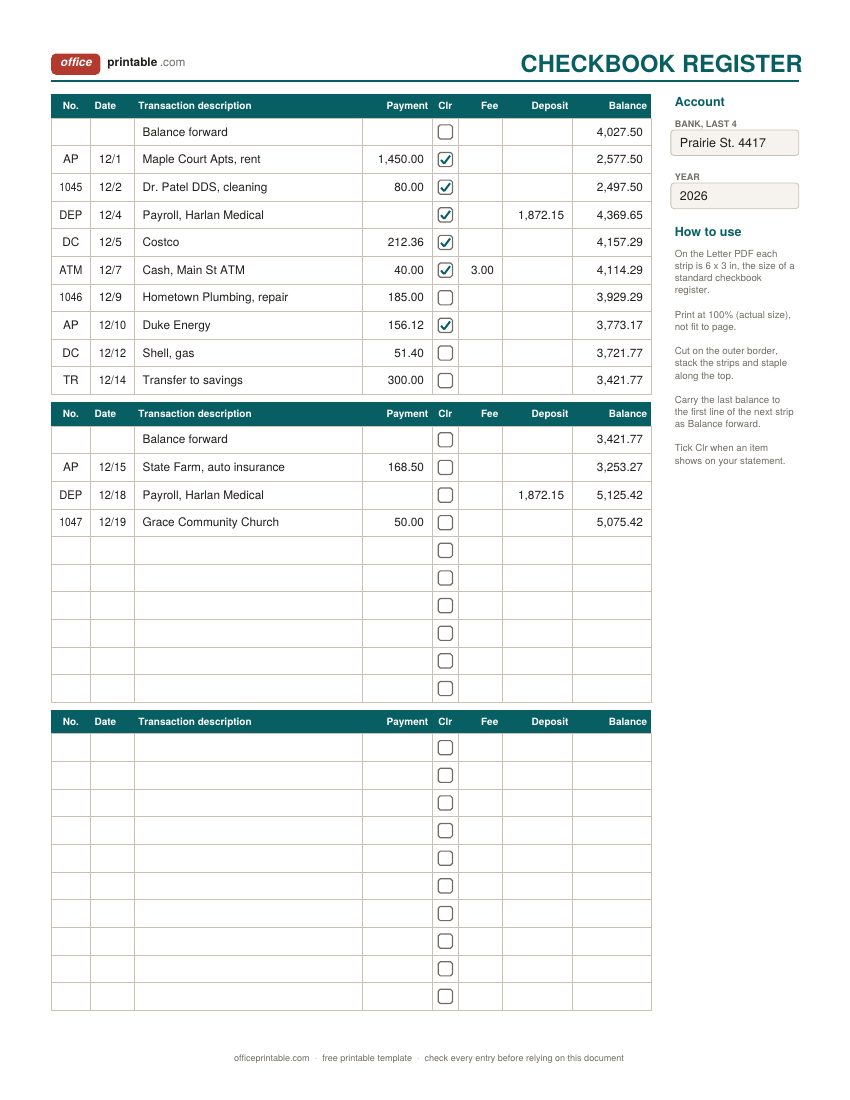
The register booklets that check printers supply with personal checks are about 6 inches wide and 3 inches tall. Retail packs are sold as "personal size" 6 x 3 inch registers that fit a standard checkbook cover. The checkbook-size design here is built to that size: on the Letter PDF each strip prints at 6 x 3 inches. Print at 100% or "actual size" (fit to page shrinks it a little), cut along the outer border, stack a few strips and staple them along the top edge so they flip up like the original booklet.
The A4 PDF keeps the same height but is a touch narrower, because A4 paper is narrower than Letter. If you print on A4 and need the full 6 inch width, use the Word file and set the page to Letter, or simply trim a little less.
Bank reconciliation, step by step
Bank reconciliation means proving that your register and the bank statement describe the same money. They almost never show the same number on the statement date, and that's normal. Checks you wrote may not have been cashed yet, a deposit may have been made after the statement closed, and the bank may have charged a fee or paid interest that you haven't written down. The reconciliation sheet lines all of that up.
- Tick every register item that appears on the statement. Tick the statement line too.
- List the unticked payments from your register as outstanding checks and withdrawals.
- List unticked deposits as deposits in transit.
- List anything on the statement that isn't in your register: monthly service fees, overdraft or ATM fees, interest, an automatic payment you forgot. Fees are negative, interest is positive.
- Bank side: statement ending balance, plus deposits in transit, minus outstanding items. That's your adjusted bank balance.
- Register side: your register balance as of the statement date, plus or minus the statement-only items. That's your adjusted register balance.
- The two should match to the cent. Then write the fees and interest into your register so it is current.
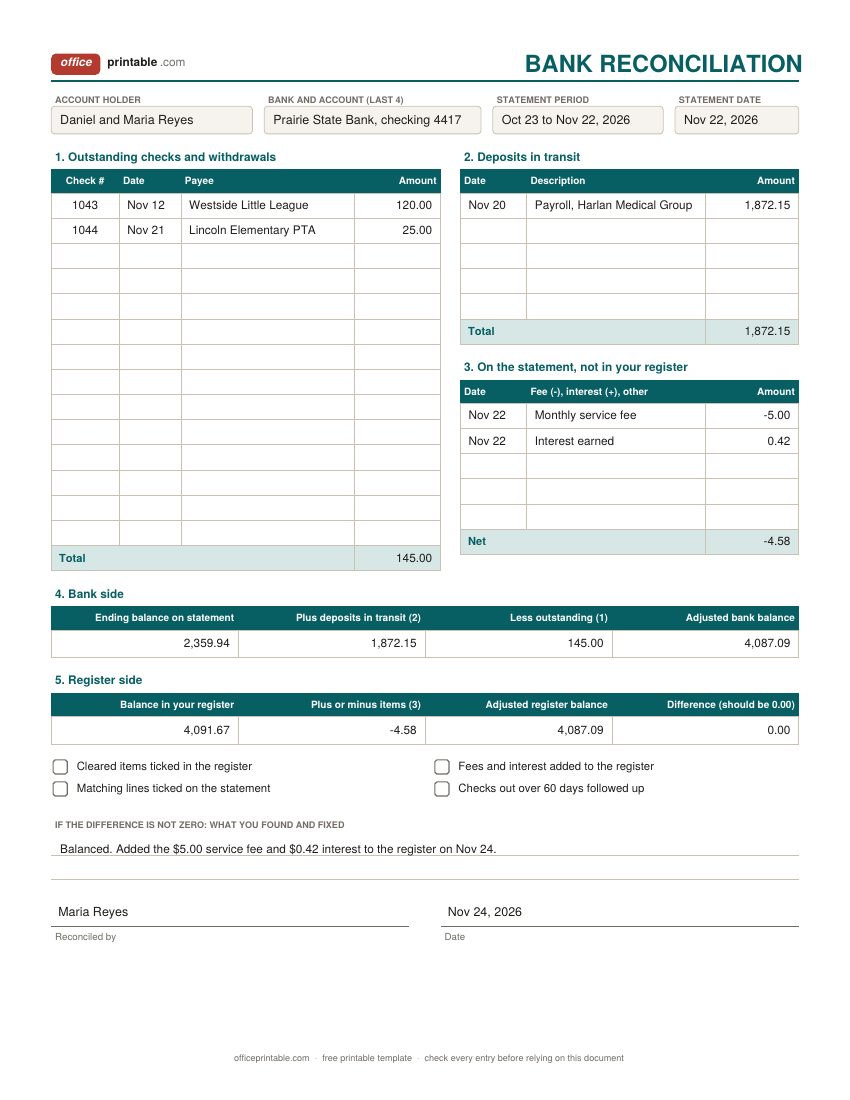
In the sample the statement ends at $2,359.94. Add the $1,872.15 paycheck that had not posted, subtract the two checks still out ($145.00), and the adjusted bank balance is $4,087.09. The register said $4,091.67; take off the $5.00 service fee and add $0.42 of interest, and you get the same $4,087.09.
When the numbers do not match
- The difference is a round number. Often a single item was missed or entered twice. Look for a payment or deposit of exactly that amount.
- The difference divides evenly by 9. That's the classic sign of two digits swapped, such as $56.20 written as $65.20.
- The difference is twice an amount. A payment was probably added instead of subtracted.
- Math errors. Re-add the balance column on paper from the last point where it agreed. The Excel version removes this one.
- Something you do not recognize. Call your bank. Under federal rules for debit cards and other electronic transfers, how quickly you report an unauthorized charge affects how much you can lose, so don't leave it for next month.
Check register, expense tracker or budget?
They do different jobs and work well together. The check register follows one bank account and answers one question: how much money is really in there? An expense tracker groups spending by category so you can see where it goes, and the monthly budget planner sets limits before the month starts. For due dates and autopay, keep a monthly bill tracker next to the register. Business owners who pay from a cash box need a petty cash log instead, and the business expense tracker totals deductible costs by category for tax time.
Using the Excel check register
Type your balance forward in the box at the top of the full-page register. Each line's balance is a formula: the balance above, plus the deposit, minus the payment and the fee. Blank lines stay blank, and the totals at the bottom show payments, fees, deposits and the ending balance. When a page fills up, copy the ending balance into the balance forward box on a fresh copy of the sheet. On the bank reconciliation sheet the outstanding, in-transit and statement-only items are totaled for you, and the difference cell tells you whether you balanced.
The checkbook-size strips are meant for printing, so their balance column is left for you to write in. The fillable PDF files let you type before printing but don't calculate. The ODT and ODS files open in LibreOffice and Google Docs or Sheets.
Questions
Do I still need a check register with online banking?
Online banking shows what has cleared. It does not know about the check you mailed on Friday or the automatic payment due next week. A register shows the money you can actually spend, which is why people who have overdrafted once tend to keep one.
What does the Clr column mean?
Clr stands for cleared. Tick it when the transaction appears on your statement or in online banking. At reconciliation time, every unticked line is either outstanding or a mistake.
How often should I reconcile my checking account?
Once a month, when the statement arrives, is the usual habit. A quick weekly look at online banking catches fraud and errors sooner.
How long is a check good for?
Under the Uniform Commercial Code rule that states follow, a bank does not have to pay a personal check presented more than six months after its date, though it may choose to. If a check stays outstanding for months, contact the payee before you assume the money is yours again.
How fast do I need to report a charge I did not make?
For debit card and other electronic transactions, the CFPB says you aren't liable for an unauthorized charge if you report it within 60 days after the statement is sent, as long as the card or PIN wasn't lost or stolen. A lost or stolen card has shorter deadlines. Rules can differ by account type, so check with your bank.
Can I print the checkbook register on card stock?
Plain paper is easier to staple and fits the register pocket better. If you like a stiffer back, print one strip on card stock and put it at the bottom of the stack.
Comments and questions
Have a question about this template, or an idea to make it better? Leave a comment.
Leave a comment