What is on the page
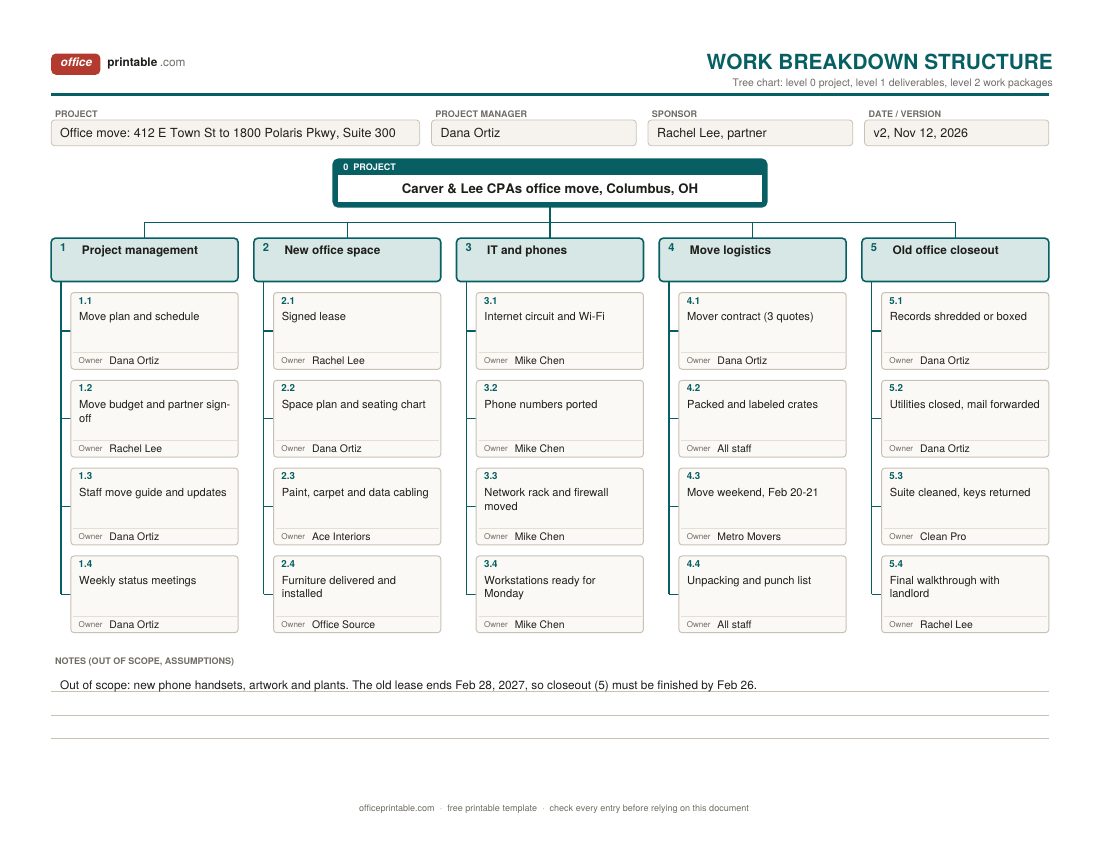
- Project box (level 0)
- The whole project in one line at the top of the tree. Everything below it has to add up to this box, and nothing more.
- Level-1 elements
- The major deliverables, numbered 1, 2, 3. Most projects need somewhere between four and seven.
- Work packages and WBS codes
- The lowest boxes, numbered 1.1, 1.2 and so on, or 1.1.1 if a package needs one more level. Each one gets a single owner.
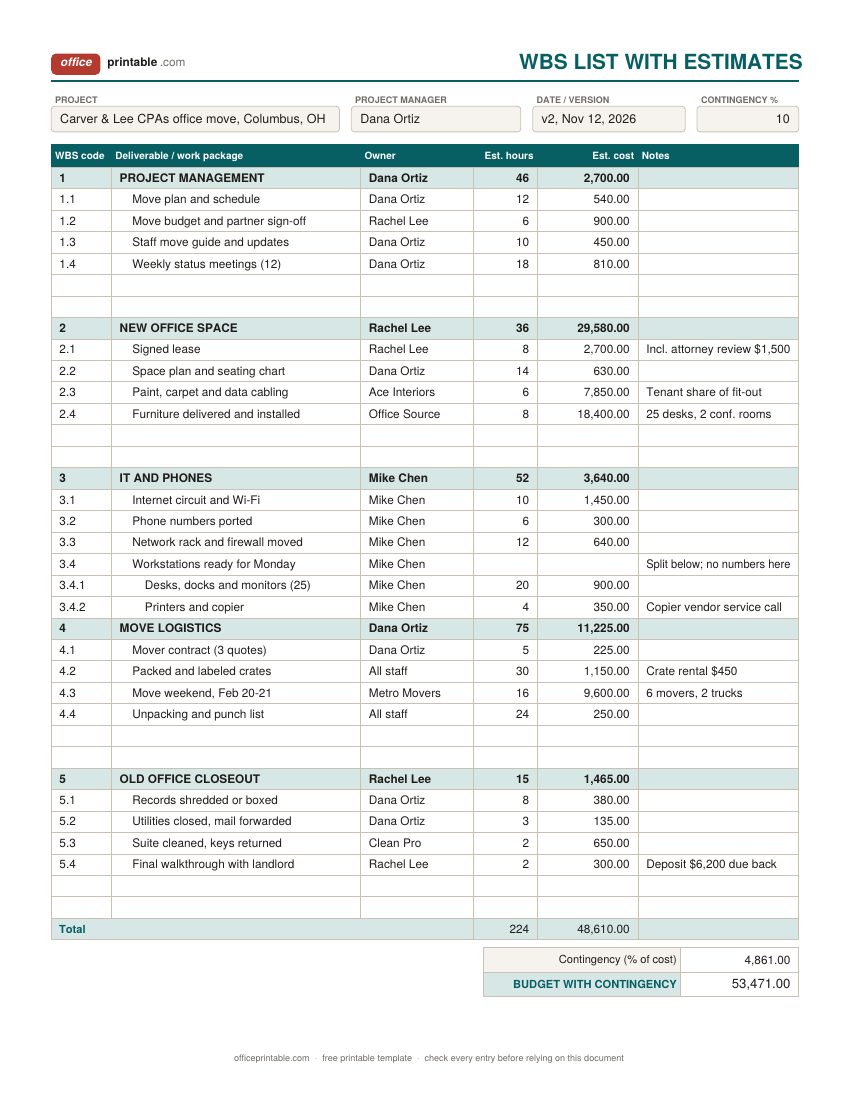
- Hours and cost
- On the indented list, the estimated effort and dollars for each work package. Excel adds up each level-1 group and the whole project, then applies the contingency percentage you enter.
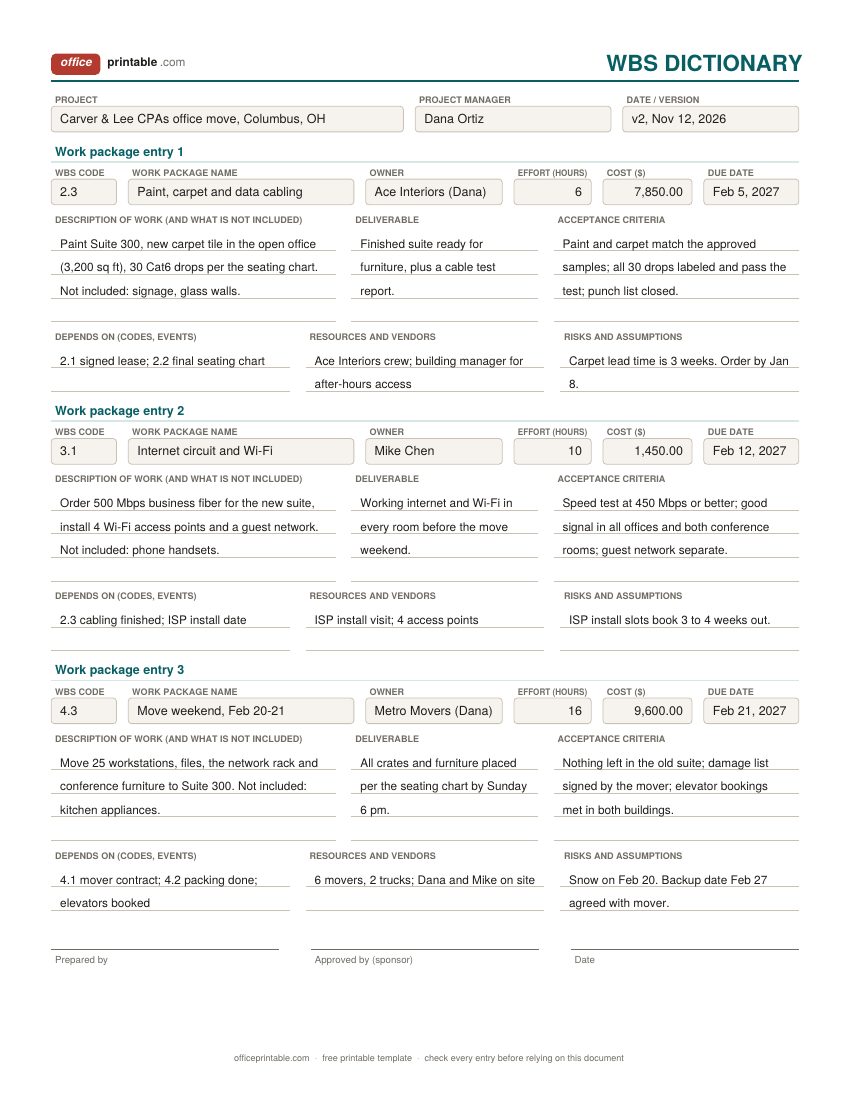
- Dictionary entries
- For each work package: what the work covers and leaves out, the deliverable, acceptance criteria, owner, effort, cost, due date, dependencies, resources and risks.
- Sign-off
- Prepared by and approved by lines on the dictionary, so the sponsor agrees to what each package includes before work starts.
What is a work breakdown structure?
A work breakdown structure (WBS) is a hierarchy of everything a project has to produce. PMI describes it as a deliverable-oriented breakdown of the total scope of a project. The project sits at the top. One level down are the major deliverables. Below those come smaller pieces, and the breaking down continues till you reach work packages: chunks of work that one person or team can own, estimate and track.
The point of the exercise is coverage. A good WBS shows all of the work, so nothing gets forgotten and nothing gets paid for twice. It says nothing about order or dates. Those come later, when you take the work packages and schedule them in a Gantt chart or a project timeline.
How to build a WBS from your project scope
- Start from the scope. Have the scope statement in front of you, with its deliverables and exclusions. If there's no scope statement yet, write one first with the project scope template.
- Name the level-1 deliverables. Write the project in the top box, then split it into four to seven major pieces. Many teams give project management its own branch, since planning and status meetings take real hours.
- Decompose. Break each level-1 box into the smaller deliverables that make it up. Write nouns, not verbs: "signed lease" rather than "negotiate the lease." Keep going until each piece is small enough to estimate with a straight face.
- Check the 100% rule. The children of every box must add up to exactly the parent. No gaps, no extra work slipped in, and no overlap between two boxes. Read each branch and ask: if all of these are done, is the parent done?
- Number and assign. Give every element a code (1, 1.1, 1.1.1) and every work package one owner. Then estimate hours and cost on the list and describe the bigger packages in the dictionary.
How small is small enough? A common rule of thumb is the 8/80 rule: a work package should take at least 8 hours and no more than 80 hours of effort. Use it as a guide. A package a vendor delivers in one visit may need only 2 hours of your own time, and that's fine. Another quick test is whether a package can be finished between two status reports, so progress shows up when you report.
Work breakdown structure example: an office move
The filled-in samples follow a 25-person accounting firm in Columbus, Ohio, moving to a new suite over the weekend of Feb 20, 2027. The project splits into five level-1 elements:
- 1 Project management: the move plan, budget sign-off, a staff move guide and weekly status meetings.
- 2 New office space: the signed lease, a space plan and seating chart, paint, carpet and data cabling, and furniture.
- 3 IT and phones: internet and Wi-Fi, phone numbers ported, the network rack, and workstations ready for Monday.
- 4 Move logistics: the mover contract, packed and labeled crates, the move weekend and unpacking.
- 5 Old office closeout: records shredded or boxed, utilities and mail, cleaning and keys, and a final walkthrough with the landlord.
On the indented list, package 3.4 is split one level further into 3.4.1 (desks, docks and monitors) and 3.4.2 (printers and copier). Its own row carries no hours because the numbers live on the lowest level only. The list comes to 224 hours of staff time and $48,610 in cost, and a 10% contingency brings the budget to $53,471. A website redesign, a trade show or a product launch breaks down the same way. Only the boxes change.
Using the WBS template in Excel
In the Excel and ODS versions of the indented list, type each work package on its own row with the owner, estimated hours and cost. The shaded level-1 rows add up the rows beneath them, and the total row adds up the whole project without counting those group subtotals a second time. Type a contingency percentage at the top and the sheet works out the contingency amount and the budget that includes it.
Some habits keep a work breakdown structure in Excel honest. Put numbers on the lowest level only: if a package is split into 3.4.1 and 3.4.2, leave 3.4 empty. Keep the codes in their own column so you can sort and filter by them. To add a work package, insert a row inside its group, above the group's last row, and the subtotal stretches to include it. The fillable PDF does not do math, so use the spreadsheet when the numbers matter.
WBS dictionary template: what goes in each entry
The tree shows names, and names are short. "Data cabling" can mean ten drops or a hundred. The WBS dictionary is where a work package gets written out in full, so the person doing the work and the person paying for it agree on what it includes. Each block on the dictionary sheet holds one work package:
- the WBS code and name, matching the tree and the list
- a description of the work, including what is left out
- the deliverable it produces and the acceptance criteria, written so anyone could check them
- owner, effort in hours, cost and due date
- dependencies, resources or vendors, and known risks
On a small project there's no need for an entry behind every box. Write them for the packages that cost the most, go to an outside vendor, or keep causing arguments. Once signed, the dictionary sits alongside the project management plan as the record of what was agreed.
WBS vs Gantt chart vs task list
These three get mixed up because they often use the same names. They answer different questions.
- The WBS answers "what?" It lists every deliverable and work package, with no dates and no order.
- The Gantt chart answers "when?" It takes the work packages, breaks them into activities and puts those on a calendar with start dates, durations and dependencies. The Gantt chart template is made for that step.
- The task list answers "who is doing what this week?" It holds day-to-day actions, many too small for the WBS, with status and due dates. A project task tracker works well for this.
The usual order is scope, then WBS, then schedule, then tasks. Start with the Gantt chart and it's easy to miss whole deliverables, because a schedule only shows the work somebody already thought of.
Common WBS mistakes
- Listing activities instead of deliverables. "Call movers, compare quotes, book the truck" belongs on a task list. The WBS entry is "mover contract."
- Breaking the 100% rule. A branch that leaves out testing, training or cleanup comes back later as a surprise cost.
- Overlapping boxes. If cabling sits under both new office space and IT, two people think they own it, or nobody does.
- Going too deep. Six levels and 300 work packages for a three-month project turns planning into filing. Stop when the pieces can be estimated and assigned.
- Copying the org chart. A WBS split by department hides the deliverables that cross teams.
- Hours on parent rows. Hours on 3.4 and again on 3.4.1 and 3.4.2 count the same work twice.
- Never updating it. When an approved change request adds scope, add the work package and its code as well.
Questions
What is a work package in a WBS?
It's the lowest level of the work breakdown structure. A work package has one owner and is small enough to estimate in hours and cost and to track until it's done. The activities on your schedule are planned from the work packages.
What is the 100% rule?
The WBS includes all of the work in the project scope, and the children of any element add up to exactly that element. Nothing is missing and nothing extra is added.
How many levels should a WBS have?
Most small and mid-sized projects need three: the project, the major deliverables and the work packages. Add a fourth level only where a package is still too big to estimate or assign.
What is the difference between a WBS and a WBS dictionary?
The WBS is the structure, meaning the boxes and their codes. The dictionary describes each box in detail: the work, the deliverable, acceptance criteria, owner, cost and dependencies.
Can I make a WBS in Word?
Yes. The Word version of the tree chart is laid out as tables, so you can type in the boxes and add or remove rows. For hours and cost the Excel list is easier, since it adds up the totals for you.
How do I number a WBS?
Number the level-1 elements 1, 2, 3, then add a decimal part for each level below: 2.1, 2.2, then 2.1.1. The number of parts tells you the level, and the same code should appear on the tree, the list, the dictionary and the schedule.
Comments and questions
Have a question about this template, or an idea to make it better? Leave a comment.
Leave a comment