What is on the page
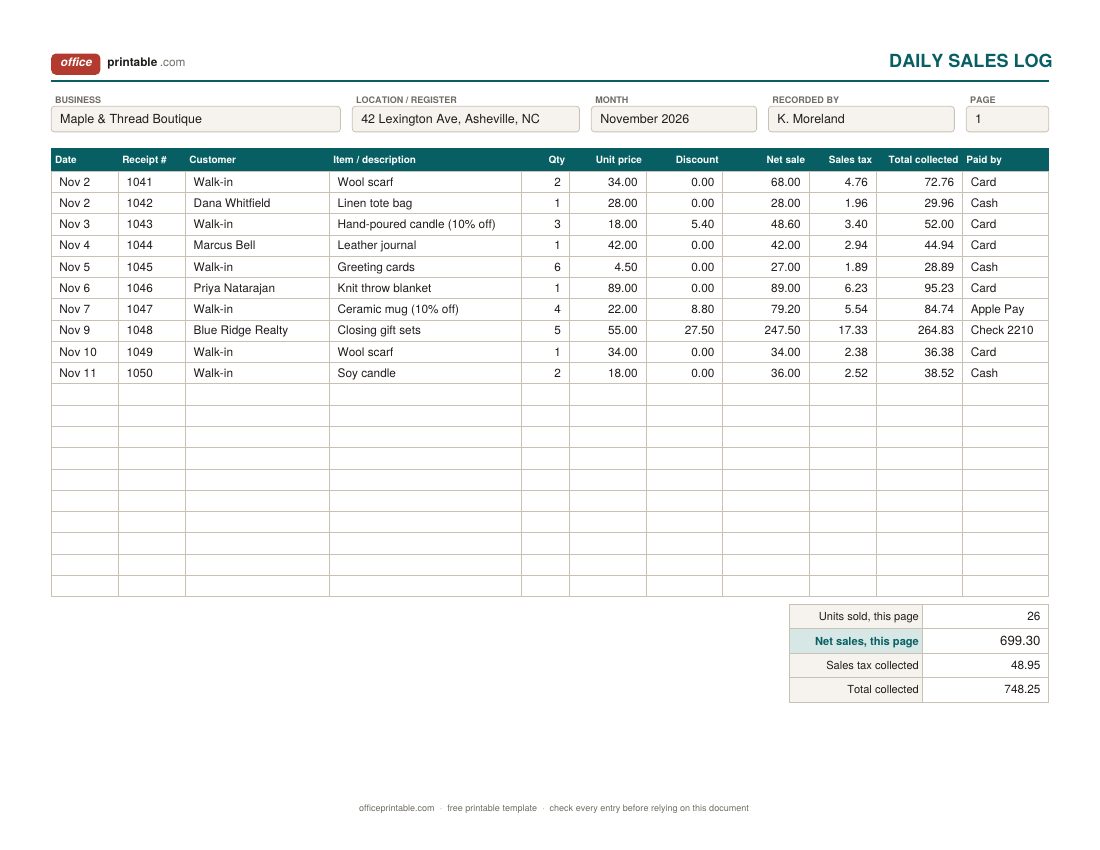
- Receipt or invoice number
- The number on the sales receipt or invoice the customer got. It ties each line of the log back to a document, so a refund or a question months later takes a minute to sort out. If you hand out paper receipts, the sales receipt template linked at the bottom of this page has a number box for it.
- Net sale
- Quantity times unit price, less any discount. This is the figure that counts toward your sales goal. Keep sales tax out of it, because the tax belongs to the state and you are only holding it.
- Sales tax
- The tax you charged on that sale, copied from the receipt or register. Keeping it in its own column means the page total is ready when you fill in your sales tax return.
- Paid by
- Cash, card, check (with the check number), or an app. When the card deposits arrive a day or two later, this column lets you match them to the sales they came from.
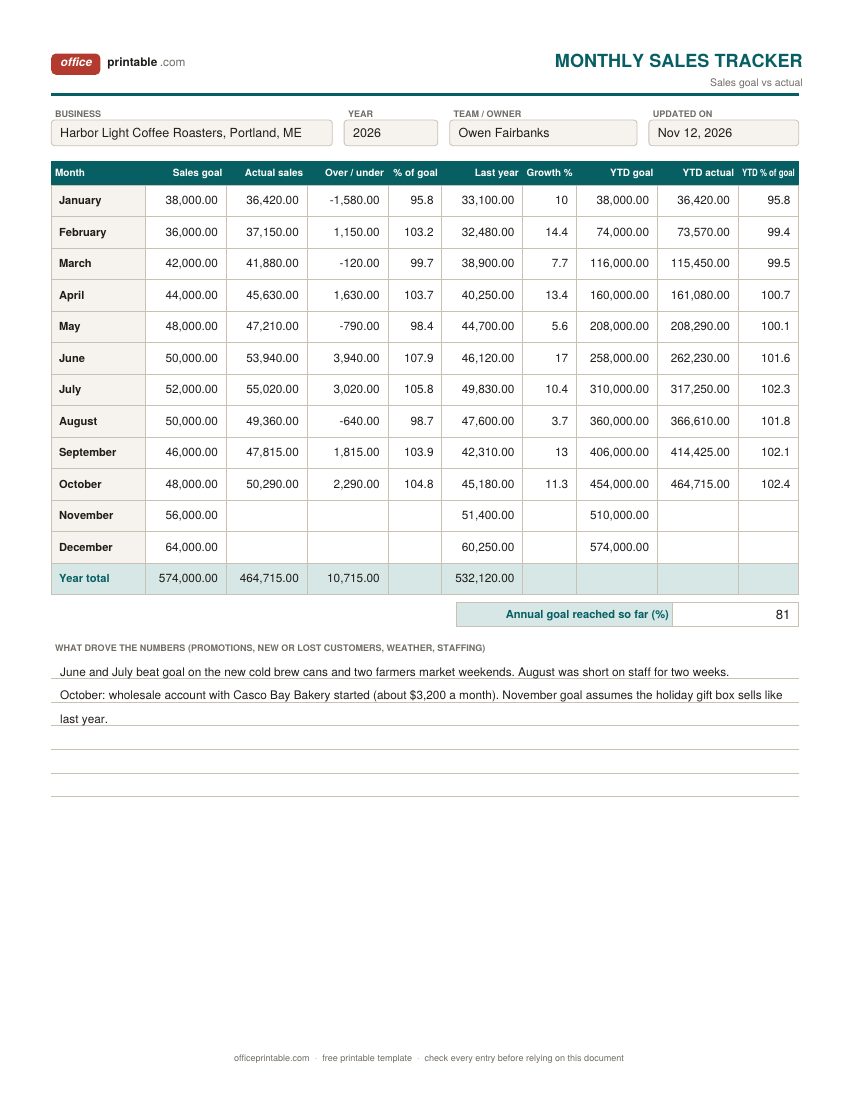
- Sales goal and % of goal
- The monthly target you set at the start of the year. Excel divides actual sales by the goal, so 100 means you hit it exactly and 93.5 means you came in 6.5% short.
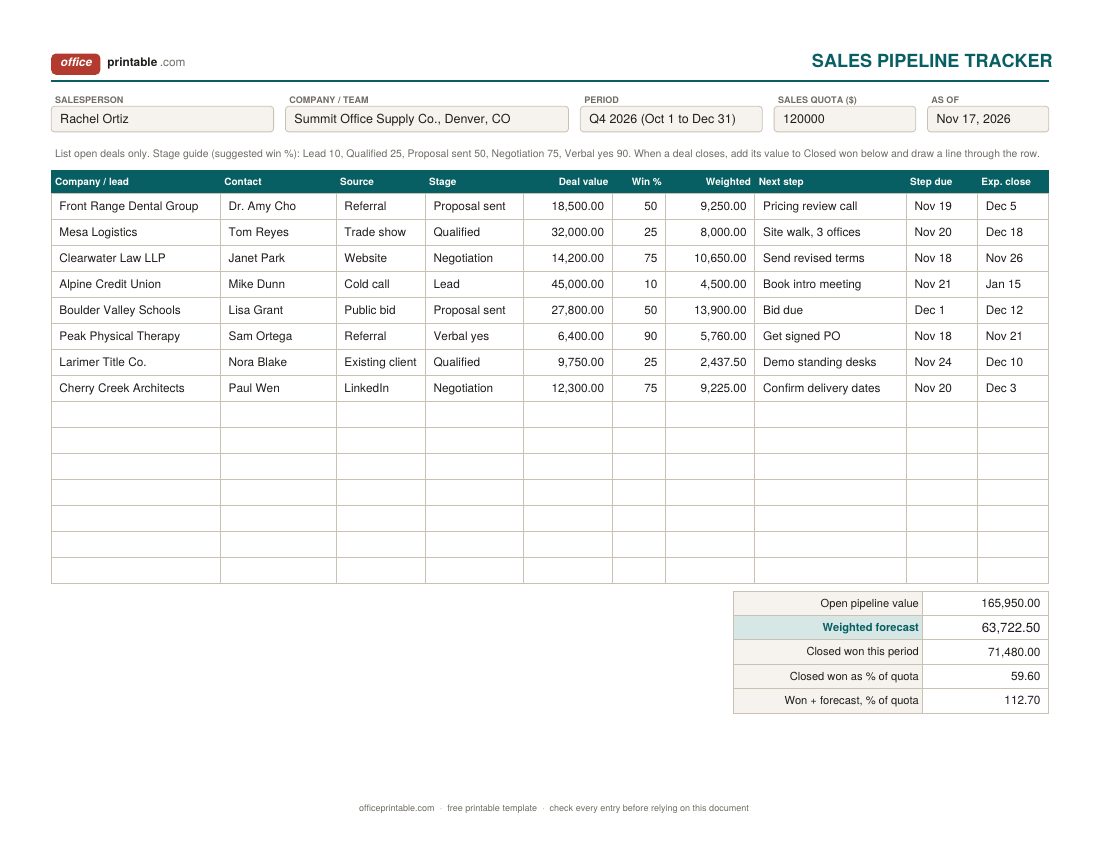
- Stage, win % and weighted value
- Where each open deal stands and your honest guess at the odds of closing it. The weighted value is deal value times win %. A $20,000 deal at 25% counts as $5,000 toward the forecast.
Which sales tracker to use
- Daily sales log: for shops, market stalls, salons, food trucks and anyone selling to walk-in customers or small orders. Fill one line per sale, or one line per register summary if you sell hundreds of items a day. Start a new page each month.
- Monthly sales tracker: one sheet for the whole year. At month end, copy the net sales total from your log (or your card processor report) into the actual column and compare it with the goal.
- Salesperson pipeline tracker: for businesses that sell by quote and follow-up, such as B2B supplies, contractors, agencies and software resellers. It tracks deals before they turn into sales which the other sheets cannot do.
Many small businesses use the log and the monthly sheet together. The log is the detail; the monthly sheet is the one-page summary you look at with your accountant or your partner.
How to keep a sales log that stays accurate
- Write the sale down the same day. A log filled in from memory on Friday always misses something.
- Use the receipt or invoice number on every line. Gaps in the numbers show you a missing sale right away.
- Record discounts as a separate amount instead of changing the unit price. At month end you can see how much the discounts cost you.
- Keep refunds on the log as their own line with a negative quantity, so the original sale stays visible.
- Once a week, add up the cash column and compare it with the cash you deposited, and compare card sales with the deposits from your card processor. Differences are easier to explain while the week is fresh.
- At month end, carry the net sales total to the monthly tracker and file the log with your receipts.
The IRS lists cash register tapes, deposit records, receipt books and invoices among the documents that support gross receipts, so a sales log backed by those papers is a sound record. Ask your tax preparer how long to keep them for your situation.
Setting a monthly sales goal you can actually use
A sales goal works best when it comes from your own history instead of a round number. Start with last year's sales for each month, which is why the tracker has a last year column. Most businesses have a season: a coffee roaster sells more in the holidays, a garden center in spring. Raise each month by the growth you expect, then adjust for anything you already know about, like a new wholesale account or a price increase.
The break-even worksheet tells you the floor: the monthly sales you need just to cover costs. A goal below that number isn't a goal. Once the year is under way, the YTD % of goal column is the one to watch. A single slow month matters less than a year-to-date figure that keeps slipping under 100.
Tracking sales by salesperson: the weighted pipeline
A pipeline lists every deal that might close, with its stage and value. Adding up the raw deal values gives a number that is always too optimistic, because many of those deals won't close. The weighted forecast is more honest: each deal counts only at its chance of closing. In the sample, $165,950 of open deals weighs in at about $63,700, and with $71,480 already won the rep is on track to pass a $120,000 quarterly quota if the odds hold.
The win percentages on the form are a common starting point. Better ones come from your own records: if half of your sent proposals turn into orders, 50% is right for that stage; if one in five does, use 20. Update the sheet once a week and keep the next step column specific. "Follow up" is not a next step. "Call Janet to confirm delivery dates by Nov 20" is.
Sales tracker vs expense tracker, invoice tracker and P&L
These sheets record different things and work best side by side. A sales receipt is the slip the customer takes home; the log is where you record that same sale. The sales tracker shows money you earned from customers. The business expense tracker shows money going out. If you invoice customers and wait to be paid, the client billing tracker follows each invoice until it's paid, which a sales log doesn't do. At month or year end, sales and expenses meet on the profit and loss worksheet, and the cash flow planner turns expected sales into a forecast of the cash you'll have in the bank.
A word on sales tax
Forty-five states charge a statewide sales tax. Alaska, Delaware, Montana, New Hampshire and Oregon don't, although some Alaska towns charge a local one. Rates, what is taxable and how often you file all depend on your state and often your city or county, so check with your state revenue department or your accountant. The log keeps tax in a separate column so you can report what you collected without picking it out of each sale later.
Editing the Excel and Word versions
The Excel and ODS files are blank sales tracking templates with the formulas already in place. Type in the white cells; the shaded cells calculate. In the monthly sheet, enter the goals for the whole year in January and the YTD goal column fills itself in. Rename the columns to suit you (for example, Item could become Service, and Paid by could become Sales channel if you sell online and in person). There's no chart built in, but you can select the Month, Sales goal and Actual sales columns and insert a column chart in Excel or Google Sheets in a few clicks. The Word and fillable PDF versions have the same layout for people who prefer to fill in a printed form by hand.
Questions
What is the difference between a sales log and a sales tracker?
People use the terms loosely. On this page the sales log is the record of individual sales, line by line, and the sales tracker is the monthly view that compares those totals with a goal. The pipeline tracker follows deals that haven't closed yet.
Should I record sales before or after sales tax?
Track net sales before tax for your goals and reports, and keep the tax you collected in its own column. Sales tax is money you hold for the state, not income, so including it would make your sales look higher than they are.
How do I record a refund or a return?
Add a new line on the day of the refund with the original receipt number, the item and a negative quantity or a negative net amount. Do not erase the original sale. The page totals then show sales after returns.
Can I use this sales tracker in Google Sheets?
Yes. Upload the Excel file to Google Drive and open it with Google Sheets. The formulas for net sale, totals and percent of goal carry over.
How many lines does the daily sales log hold?
Each page has 20 lines. Busy shops can record one line per register summary or per hour instead of per sale, or start a new page and number them at the top.
Is this a replacement for a CRM or point-of-sale system?
For a small business with a modest number of sales or deals, a spreadsheet does the job and costs nothing. When you have several salespeople, hundreds of leads, or need inventory to update with each sale, a CRM or POS system will save you time, and you can still use the monthly tracker for the goal-vs-actual summary.
Comments and questions
Have a question about this template, or an idea to make it better? Leave a comment.
Leave a comment