What is on the page
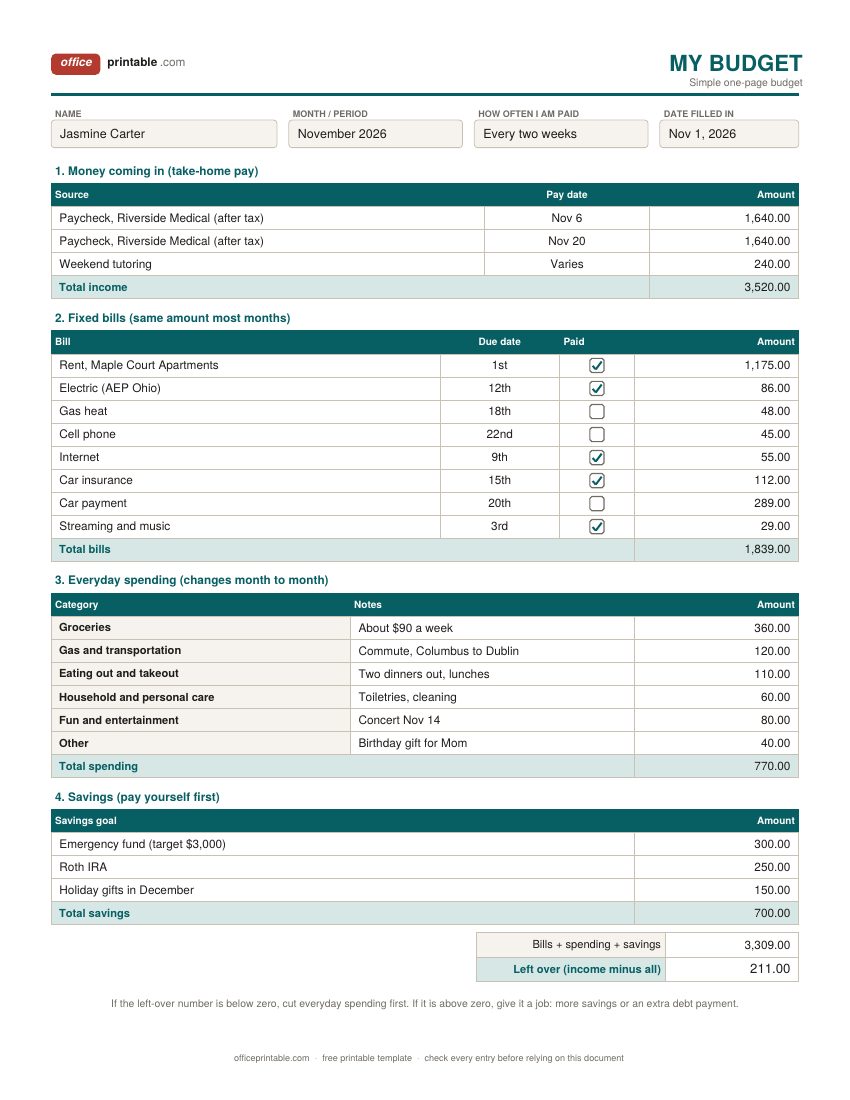
- Name, month and pay schedule
- Who the budget is for, the month or year it covers, and how often you get paid. Pay schedule matters more than people expect: biweekly pay means two months a year with three paychecks.
- Income (take-home)
- The money that actually reaches your bank account after taxes, health insurance and retirement deductions come out. Write each paycheck on its own line with its date.
- Fixed bills
- Rent, utilities, phone, insurance, loan payments and subscriptions. The simple budget has a due date and a paid box for each one.
- Everyday or variable spending
- Groceries, gas, eating out, personal care and fun. These are the lines you can change quickly, so they are where most budgets succeed or fail.
- Savings and debt payments
- Treated as bills you pay yourself, not as whatever is left. Emergency fund, retirement, sinking funds for known costs, and payments above the minimum on debt.
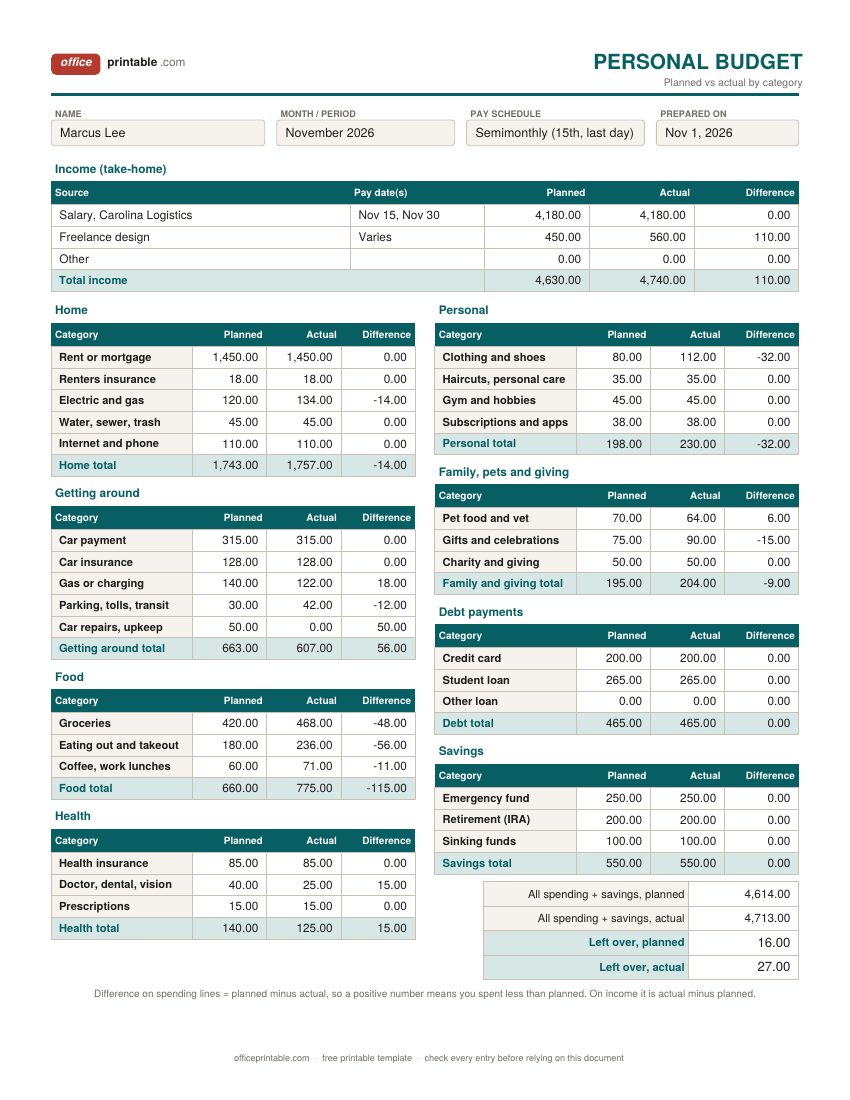
- Planned, actual and difference
- On the personal budget, the planned column is your plan before the month starts, actual is what happened, and the difference shows which lines to change next month.
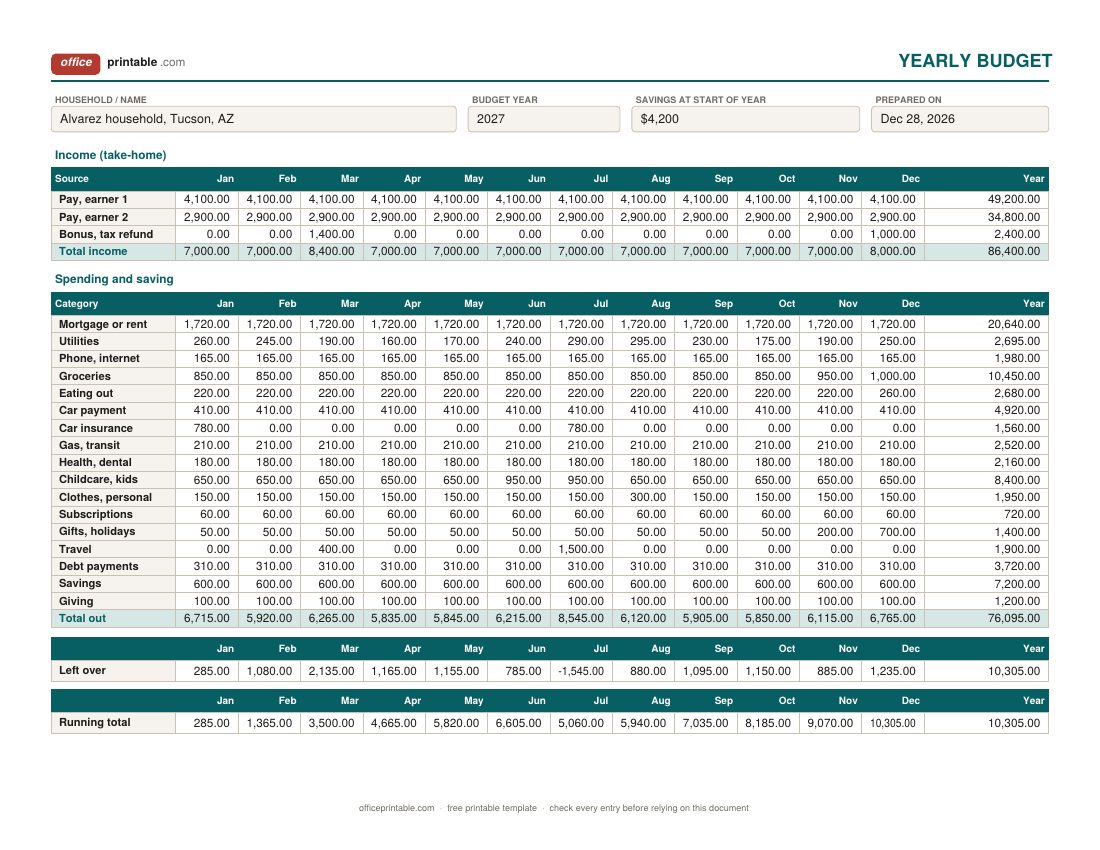
- Month columns and year total
- On the yearly budget, each category gets an amount for every month, and the year total shows what that category really costs you over twelve months.
- Left over and running total
- Income minus everything going out. On the yearly sheet the running total adds each month to the last, so you can see if a big month will be covered by the months before it.
How to fill in this budget template
- Gather two or three months of statements. Bank, credit card and any payment apps. You want real numbers, not guesses.
- Write down your take-home income. Use the amount on your pay stub after deductions. If your pay changes from month to month, use your lowest normal month.
- List the fixed bills. Copy them from your statements with the due date. Don't forget the small automatic charges which are the easiest to miss.
- Set the everyday spending lines. Average what you spent over the last few months, then decide what you want each line to be. Be honest about groceries and eating out.
- Decide on savings before the month starts. Even $25 a paycheck builds the habit. Move it on payday so it never sits in checking.
- Check the left-over line. If it's negative, trim everyday spending or look at a bill you could lower. If it's positive, give that money a job.
- Review at the end of the month. Write in what actually happened and change next month's numbers where you were far off.
Which budget design to choose
The simple budget template is the one to start with. It asks for one number per line and fits a month on a single page, so it's quick to fill in at the kitchen table. Use it if you are new to budgeting, if your bills are fairly steady, or if you want a printable budget to stick on the fridge.
The personal budget template is for when you want detail. It splits spending into twenty-nine categories, and each one has a planned amount, the actual amount and the difference. After a month or two you will know exactly which lines go over, which is hard to see on a short budget. It suits a single person or a couple with one shared budget.
The yearly budget template puts all twelve months on one wide page that prints sideways. It's the best way to plan for costs that don't come every month: car insurance paid twice a year, back-to-school shopping, holiday gifts, a summer trip. Many people fill it in once in December or January, then check it against the real numbers each month.
If you want a zero-based or 50/30/20 budget instead, those are on the monthly budget planner page. For a big-picture view of household costs with yearly amounts and the share of income each takes, see the household budget worksheet.
Printable budget template or spreadsheet?
Both work, and the best one is the one you will keep using. Writing a budget by hand makes you look at every number, and many people find that slower process is exactly what changes their spending. A printed sheet is also easy to share with a partner and doesn't need a login or an app.
The fillable PDF sits in between. You type into the boxes, save the file and print it if you want a paper copy, but the PDF does not add anything up. If you want totals worked out for you, use the Excel version of the same design from this page, or the separate budget spreadsheet page, which is built for Excel and Google Sheets from the start.
Budget categories that cover most of a household budget
The categories on these sheets follow the way most American households actually spend. In the federal Consumer Expenditure Survey for 2025, housing took 33.9% of average household spending, transportation 16.5% and food 13.0%. Those three groups alone are close to two-thirds of the total. That is why the free budget template puts rent, the car and groceries near the top, and why small savings on those lines often matter more than cutting out coffee.
Your own split will look different depending on where you live and who is in your household. Rename any category that doesn't fit. A line that stays at zero for three months can go, and anything that keeps landing in "Other" probably deserves its own row.
Planning a yearly or annual budget
A monthly budget can look fine every month and still fall apart in August. The reason is usually irregular costs: an insurance premium paid every six months, property tax, car registration, a birthday month with three gifts, the holidays. A yearly budget template catches these because you see all twelve months at once.
Start with the regular income and bills, which repeat across the row. Then go through the calendar and add the one-off costs in the month they happen. Look at the left-over row. In the sample, July runs short because of a trip, summer camp and the car insurance bill, but the running total shows that the spring months build enough to cover it.
A common way to smooth this out is a sinking fund. Add up the irregular costs for the year, divide by twelve, and put that amount aside every month. When the bill comes, the money is already there. The savings goal tracker is a good place to watch those funds grow.
Making the budget stick after the first month
Most budgets aren't abandoned because the plan was wrong. They're abandoned because nobody checked the actual numbers until the money was gone. Pick one day a week, ten minutes, and write down what you spent. An expense tracker makes this easier, and a bill tracker keeps due dates from slipping.
Leave a little room for fun. A budget with no spending money in it tends to last about three weeks. If you're paying off cards or loans, a debt payoff tracker shows progress in a way the budget alone can't. And if you're paid every two weeks, the paycheck budget planner lets you plan each paycheck on its own.
Using the Word and Excel budget files
The Word files are plain tables. Change a category name, add your own bills, then print or save as PDF. The Excel and ODS files do the math: totals for each section, the difference column, the left-over amount and, on the yearly sheet, the year totals and running total all update as you type. Type into the white cells and leave the shaded total cells alone. The PDF is fillable on screen but doesn't calculate, so add up the totals yourself or use Excel if you want them done for you.
Everything here is a planning aid only. For questions about taxes, debt or retirement savings that depend on your own situation, check with a qualified financial professional.
Questions
What should a simple budget include?
At the least: take-home income, fixed bills, everyday spending, savings, and what is left over. That's exactly what the simple one-page budget asks for. Once those numbers are honest, you can add more detail.
Should I budget with gross or net pay?
Use net pay, the amount that lands in your bank account. Taxes and payroll deductions are already gone before you can spend anything, so budgeting from gross pay makes the plan look healthier than your real bank balance.
What is the difference between a personal budget and a household budget?
A personal budget usually covers one person's income and spending. A household budget pulls together everyone who shares costs. The personal budget template works for a couple with one shared budget too; the household budget worksheet is better when you want to split costs between earners.
How do I budget for bills that come once or twice a year?
Put them in the month they're due on the yearly budget, then set aside one twelfth of the yearly total every month as a sinking fund so the money is ready when the bill arrives.
Can I print the budget template on A4 paper?
Yes. Each design has a US Letter PDF and an A4 PDF, and the Word and Excel files can be printed on either size.
Does the fillable PDF calculate totals?
No. You can type into it and save it, but it doesn't add up. The Excel and ODS versions calculate all the totals.
Comments and questions
Have a question about this template, or an idea to make it better? Leave a comment.
Leave a comment