What is on the page
- Timeline title and subject
- Say what the timeline is about in a few words, plus the class, company or person it covers. A teacher or a visitor should know the topic before reading a single event.
- Time span
- The first and last year (or month) on the timeline. It tells the reader the scale at a glance.
- Date
- As exact as you know it. "Jul 4, 1776" is best, "Spring 2015" is fine for a family history, and a year on its own works for long spans.
- Event
- A short title of two to five words. This is what people read first, so keep it plain.
- Notes or details
- One line on what happened, or why it matters. The vertical design gives you more room for this than the horizontal one.
- Sources and notes
- Where the dates came from. Most school assignments ask for it, and it saves you checking everything twice.
Which timeline template to use
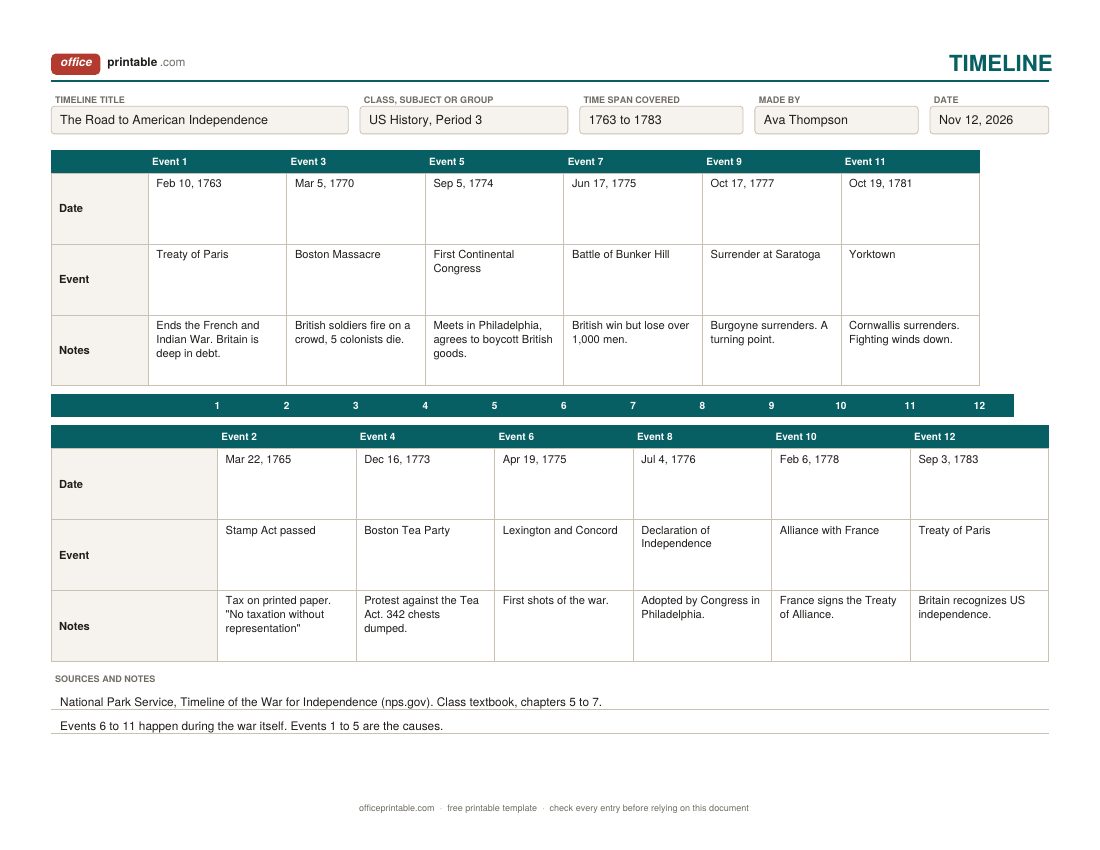
The horizontal timeline is the one most people picture: a line across the page with events spread along it. Odd-numbered events sit above the line and even-numbered ones below, so the cards don't crowd each other. It works best for ten to twelve events that each need only a date, a title and a short note. Teachers like it because the order of events jumps out at once.
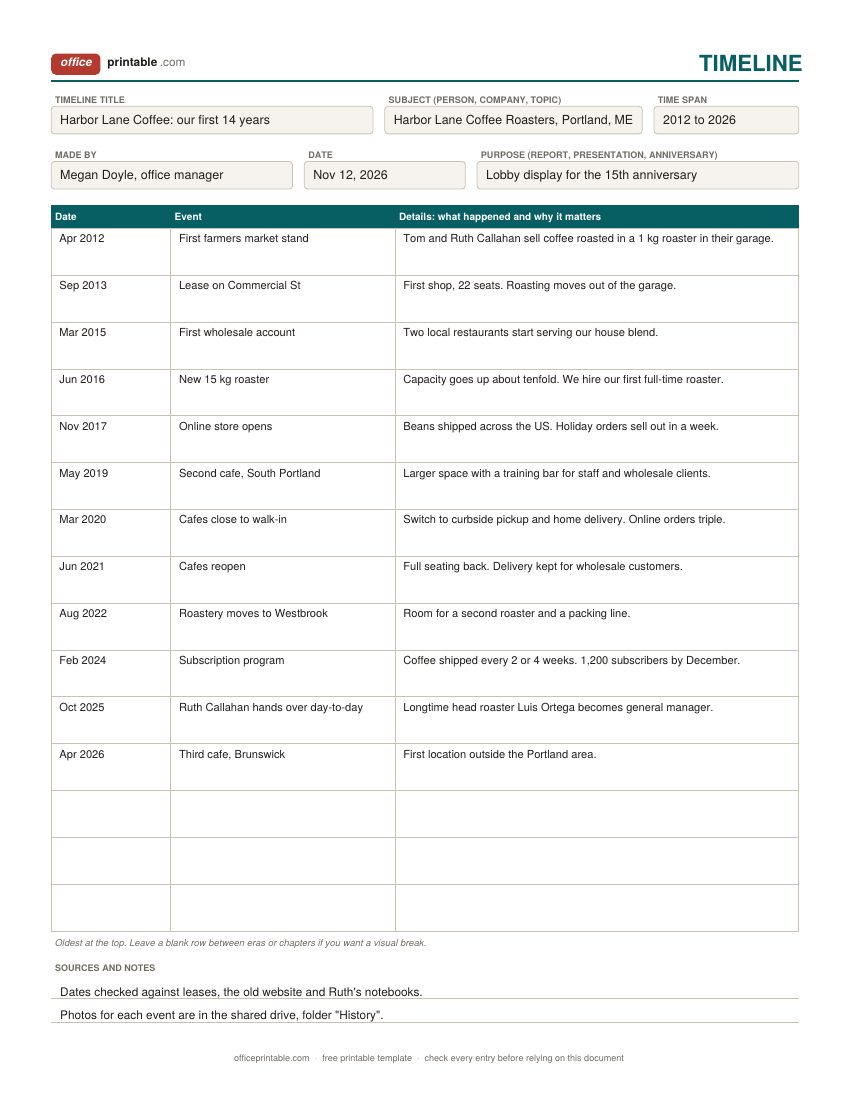
The vertical timeline template trades the picture for space. Dates go down the left, and each event gets a wide details column. Pick it for a company history, a biography, a family history or a research paper where every entry needs a sentence or two. A list running down the page is also easier to type into and to keep adding to.
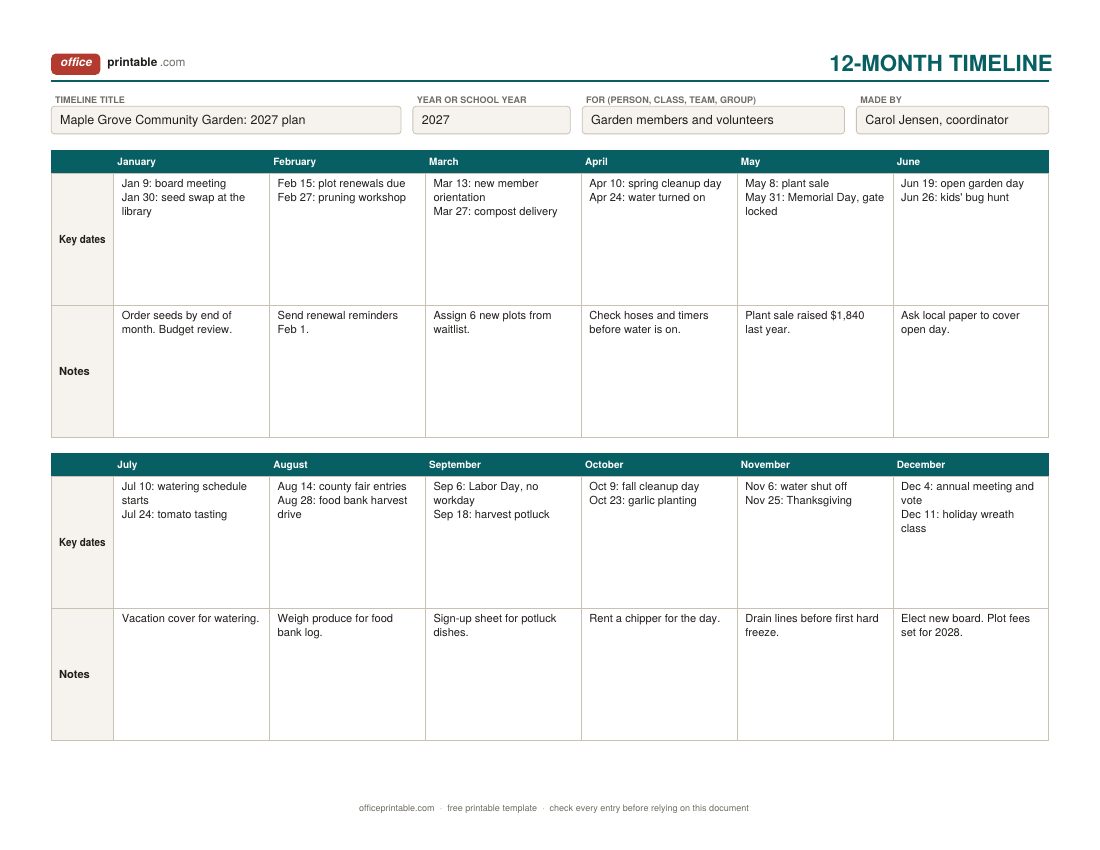
The 12-month timeline is for one year. Every month gets its own column for key dates and a notes box underneath. It suits a club or family year plan, a school year, or a nonprofit's calendar of events. For a school year that runs August to June, start reading at the August column and use the July box for summer plans.
How to make a timeline
- Decide what the timeline is for. A class poster, a slide in a presentation and an anniversary display all need different amounts of detail. Write the title first; it keeps you on topic.
- Choose the scale. Work out the first and last date and how much time each step covers. Two hundred years of history and one wedding day both fit on a page, but not at the same scale. For a single year, the 12-month layout already sets the scale for you.
- Collect more events than you need. Make a rough list with dates, then cut. Keep the events that changed what came next and drop the ones that only add noise.
- Put them in date order. Check each date against a reliable source. On a printed template, number your events on scrap paper first so you don't have to squeeze one in later.
- Keep labels short. Two to five words for the event title. Put the explanation in the notes, not in the title.
- Add your sources and check it once more. Read it from left to right (or top to bottom) and make sure the story makes sense to someone who knows nothing about the topic.
Timeline examples
History timeline for a class. The filled-in horizontal example follows the road to American independence, from the Treaty of Paris in 1763 to the second Treaty of Paris in 1783. Twelve events is about right for a unit like this. A history timeline template also works for a war, a reign, a civil rights movement or the life of a scientist.
Company history. The vertical example traces a small coffee roaster from a farmers market stand to three cafes. Businesses use this kind of list for an anniversary, an About page, a pitch deck or new-hire onboarding. Ask longtime staff to check the dates; memories drift.
Wedding day. Use the vertical design with times in the date column: hair and makeup at 9:00 AM, photos at 1:30 PM, ceremony at 4:00 PM, dinner at 6:30 PM, and so on. Give a copy to the photographer, the venue and the wedding party so everyone is working from the same times.
Product launch. Put the launch on the 12-month timeline with the dates that matter to people outside the team: the announcement, the first shipment, a trade show, the first review. If you need tasks, owners and dependencies, that is project scheduling, and the project timeline template or the Gantt chart template will serve you better.
Personal life timeline. Schools often ask students to make one, and therapists and memoir writers use them too. Start with birth, add moves, schools, jobs and big family events, and use the details column for what each one meant to you.
Printable timeline template tips
The printable timeline template comes in US Letter and A4, and the PDF is fillable, so you can type in it and print, or print it blank and write by hand. For a classroom wall or a science fair board, print the horizontal design on 11 x 17 inch (tabloid) paper; most printers have a "fit to page" setting that scales it up cleanly. Color-code events by type with highlighters (political events in one color, battles in another, for example) and add a small key in the sources box.
If twelve slots aren't enough, print two copies and tape them end to end, carrying the numbering on to 13 and beyond. That beats cramming two events into one card.
Timeline template in Word and Excel
The timeline template for Word is the easiest way to change things: rename the column headings, add rows to the vertical timeline, swap the month names for a fiscal year, or paste in small pictures. Each design fits on one page as downloaded. The Word file has no calculations to break.
The Excel and ODS versions are plain grids, with no formulas. In the vertical timeline you can type the dates in any order and use Data > Sort on the Date column to put them in order, as long as the dates are real Excel dates (type 6/15/2016 or 2016-06-15 rather than "June 2016"). Excel can't store dates before 1900 as dates, so for older history type the year as text and sort by hand. The fillable PDF works in Adobe Acrobat Reader and most browsers; save it after typing so your entries stay. The ODT and ODS files open in LibreOffice and can be uploaded to Google Docs or Sheets.
Planning a full year rather than a list of events? The yearly planner has a goal page and a month-by-month overview, and the yearly calendar shows every day of the year with US holidays marked.
Common timeline mistakes
- Too many events. If a reader can't take it in within a minute, cut some or split the timeline in two.
- Long titles. A full sentence in the title slot makes the whole thing hard to scan.
- Uneven date formats, such as "1776" next to "March 5th, 1770" and "10/19/81". Pick one style and keep it.
- Events out of order because one was added late. Plan the order before you write in pen.
- No title or time span, so nobody knows what they're looking at.
- Dates copied from one website without a second check. Dates for older events often differ between sources, and a quick check against a museum, archive or textbook catches most errors.
Questions
What is a timeline template?
A ready-made page with places for dates and events in order, so you only fill in the content. It saves you from drawing the line and spacing the events yourself.
How many events should a timeline have?
For a one-page school timeline, eight to twelve is usually enough. A vertical timeline can hold more because each entry is a row. With more than about fifteen, split the period in two.
Can I print a blank timeline template and fill it in by hand?
Yes. Print the PDF blank on Letter or A4 paper. The horizontal design leaves room for handwriting in every card, and the vertical one has tall rows for details.
Is there a timeline template in Word?
Yes. Every design comes as a Word file that you can edit freely: change the headings, add rows, or insert pictures. It also comes as an ODT file for LibreOffice.
What is the difference between a timeline and a Gantt chart?
A timeline shows events or dates in order. A Gantt chart shows tasks as bars from a start date to an end date, usually with owners, and is used to manage a project. Use the Gantt chart template for scheduling work.
How do I make a vertical timeline?
Use the vertical design: oldest date at the top, one event per row, a short title, then the details. Keep the date format the same on every row so it reads cleanly down the page.
Comments and questions
Have a question about this template, or an idea to make it better? Leave a comment.
Leave a comment