What is on the page
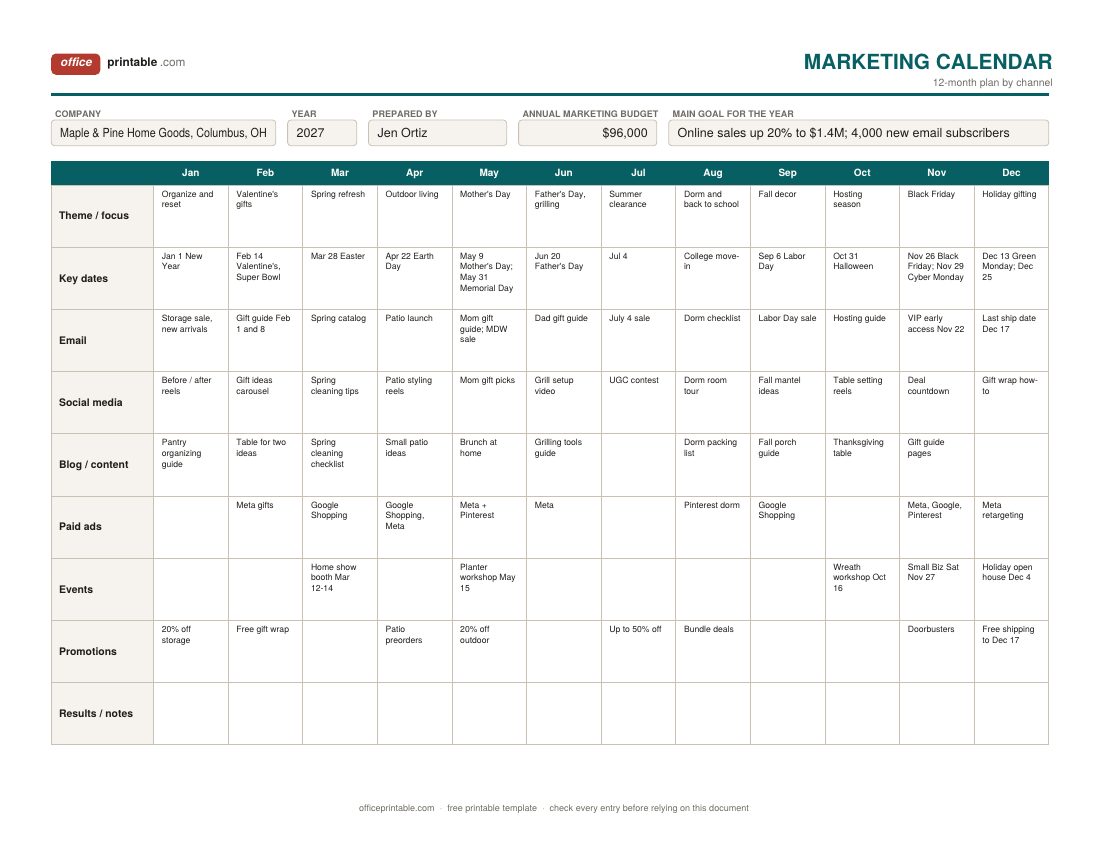
- Theme or focus for each month
- One line that says what the month is about for your business: "spring refresh", "back to school", "Black Friday". Every channel row below it should support that theme.
- Channels
- Email, social media, blog and content, paid ads, events and promotions each get a row on the yearly plan. Rename them to match what you actually use, such as direct mail, SMS, PR or trade shows.
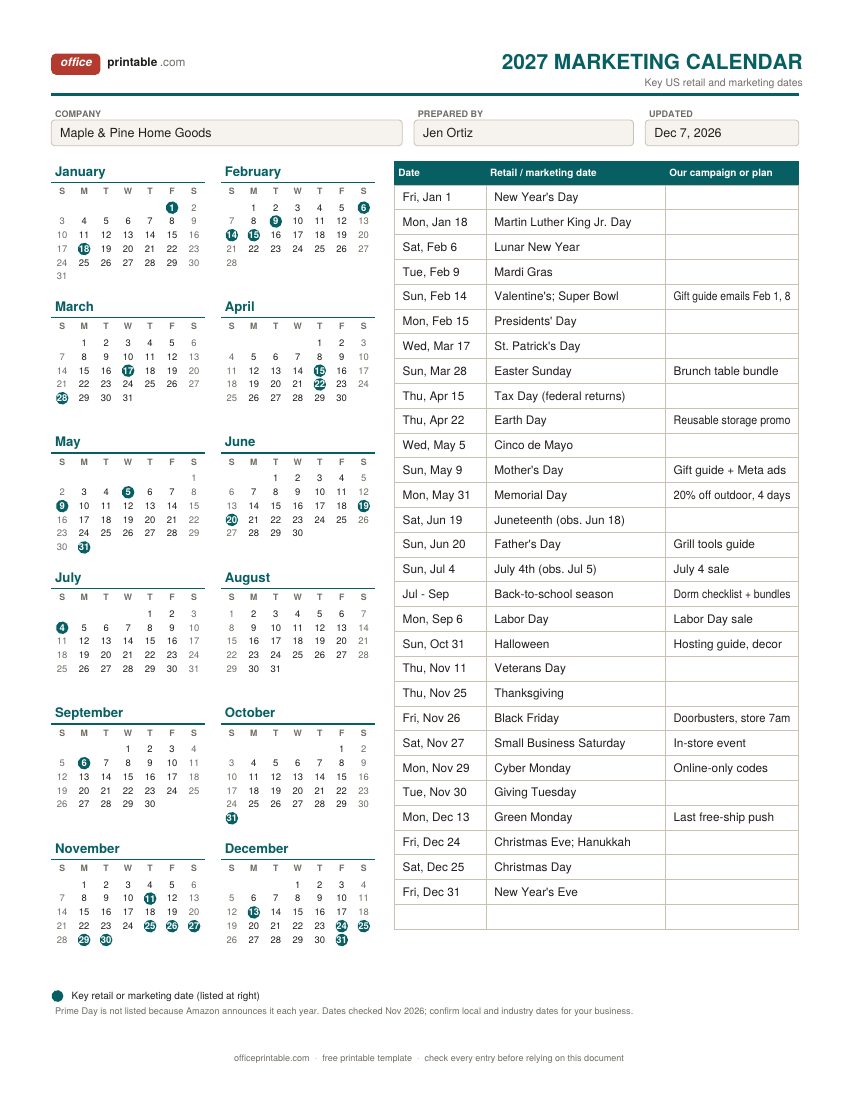
- Key retail and marketing dates
- The 2027 dates that move US shoppers, from New Year's Day to New Year's Eve, with a column for the campaign you plan for each one.
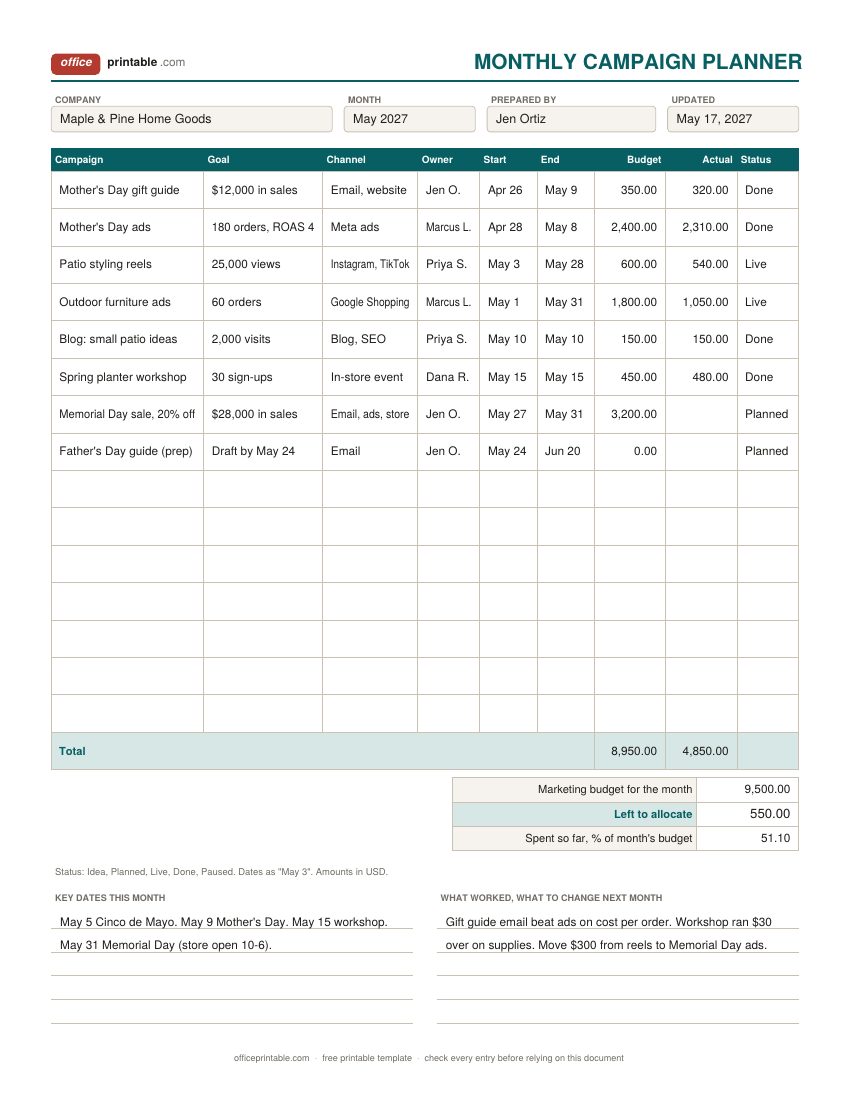
- Campaign, goal and owner
- On the monthly campaign planner, each campaign gets a measurable goal and one named owner, so nothing sits unassigned.
- Start, end and status
- When the campaign runs and where it stands: idea, planned, live, done or paused.
- Budget and actual spend in USD
- What you plan to spend on each campaign and what you really spent. Excel totals both and works out what is left of the month's budget.
What a marketing calendar does
A marketing calendar answers one question for everyone on the team: what are we promoting, where, and when? Without one, campaigns get planned around whoever remembers the date. Seasonal pushes start late, the email list hears about three offers in one week and nothing for a month, and the ad budget runs out before the holidays. A year on one page fixes most of that. You see the gaps, you see the pile-ups, and you can line up email, social media, ads and in-store events behind the same message each month.
This page is about timing. If you still need to decide who your customer is, what you will say and how much to spend in total, start with the marketing planner which has a one-page plan and a budget by channel. Then come back and put that plan on the calendar.
How to fill in the marketing calendar template
- Mark the fixed dates first. Copy the retail dates that matter to your customers from the 2027 marketing calendar into the "Key dates" row. Add your own: store anniversary, product launches, trade shows, the slow weeks you want to fill.
- Give each month a theme. Keep it short. "Mother's Day" in May, "Hosting season" in October.
- Work back from each big date. Most seasonal campaigns need two to six weeks of lead time. A Mother's Day gift guide that goes out on May 7 is too late for anything that ships.
- Fill the channel rows. One or two words per cell is enough on the yearly plan. Detail goes on the monthly campaign planner.
- Leave room. Keep a few cells empty for news, a trend, or a supplier deal you can't see yet.
- Review monthly. Write what happened in the results row and adjust the months ahead.
Key US marketing dates in 2027
These dates are already on the 2027 marketing calendar design. Several fall differently than in 2026, so check your plans against them:
- Super Bowl LXI and Valentine's Day: both on Sunday, February 14, 2027. Game-day food promotions and Valentine's gift campaigns will compete for the same weekend, so plan gift emails for the first week of February.
- Easter: Sunday, March 28, 2027, early in spring.
- Mother's Day: Sunday, May 9. Memorial Day: Monday, May 31.
- Father's Day: Sunday, June 20. Juneteenth falls on Saturday, June 19, and is observed on Friday, June 18.
- Independence Day: Sunday, July 4, observed Monday, July 5.
- Back to school: a season, not a date. In the National Retail Federation's 2026 survey, 62% of back-to-school shoppers had already started by early July, so July isn't too early.
- Labor Day: Monday, September 6. Halloween: Sunday, October 31.
- Thanksgiving week: Thanksgiving on November 25, Black Friday on November 26, Small Business Saturday on November 27, Cyber Monday on November 29 and Giving Tuesday on November 30.
- December: Green Monday on December 13, Hanukkah beginning at sundown on Friday, December 24, and Christmas on Saturday, December 25.
Amazon Prime Day is left off because Amazon picks new dates each year. Add it when it's announced if you sell on Amazon or match its deals. For federal holidays and week numbers on a plain year view, the yearly calendar has 2027 on one page.
Planning campaigns month by month
The monthly campaign planner is where the yearly plan turns into work. Fill one sheet per month, about two weeks before the month starts. Each row is one campaign with a goal you can check later ("$12,000 in sales", "30 sign-ups", not "awareness"), the channel, one owner, the start and end dates and the budget in dollars. As the month runs, update the status and enter the actual spend.
In the Excel and ODS versions, type the month's marketing budget into the totals area. The sheet adds up planned and actual spend, shows what is left to allocate and the percentage of the budget already spent. In the sample, the store planned $8,950 of a $9,500 May budget, leaving $550, and had spent $4,850 (51.1%) by mid-month. If you also want to log daily tasks, a monthly calendar works well beside it.
Marketing calendar, content calendar or social media calendar?
The three overlap, but each has its own job. A marketing calendar is the top level: campaigns, promotions, launches and seasonal dates across every channel, usually for a full year. A content calendar plans individual articles, videos and newsletters with writers and deadlines; the content planner covers that. A social media calendar plans single posts by day and platform, with captions and hashtags; see the social media planner. Most small businesses need the marketing calendar first and fill the other two from it.
Printing and editing the files
The fillable PDFs come in US Letter and A4. Type into them on screen or print them blank for a planning meeting; the channel-by-month plan prints sideways on one sheet and works well pinned to a wall. The Word files are easy to retitle and recolor. The Excel files open in Excel, Google Sheets and LibreOffice, and only the campaign planner does math. Rename the channel rows to match yours, and save a new copy each year so you can compare.
Questions
What should be on a marketing calendar?
Monthly themes, the key dates for your customers, every channel you use (email, social, content, ads, events, promotions), campaign start and end dates, owners and budgets. Keep the year view short and put detail on a monthly sheet.
How far ahead should I plan a marketing calendar?
Plan the full year in broad strokes, usually in November or December, and the detail one or two months ahead. Big seasonal campaigns such as Black Friday often need planning by late summer.
When is Black Friday 2027?
Friday, November 26, 2027, the day after Thanksgiving on November 25. Small Business Saturday is November 27 and Cyber Monday is November 29.
When is Mother's Day 2027?
Sunday, May 9, 2027. Father's Day is Sunday, June 20, 2027.
Is there an Excel marketing calendar template?
Yes. Each design downloads as an Excel file. The monthly campaign planner totals budget and actual spend, shows what is left to allocate and the share of the month's budget spent.
Can I use this as a marketing calendar for 2028?
The channel-by-month plan and the campaign planner have no printed dates, so they work for any year. The key-dates design is for 2027 only, because holidays like Easter and Thanksgiving move each year.
Comments and questions
Have a question about this template, or an idea to make it better? Leave a comment.
Leave a comment