What is on the page
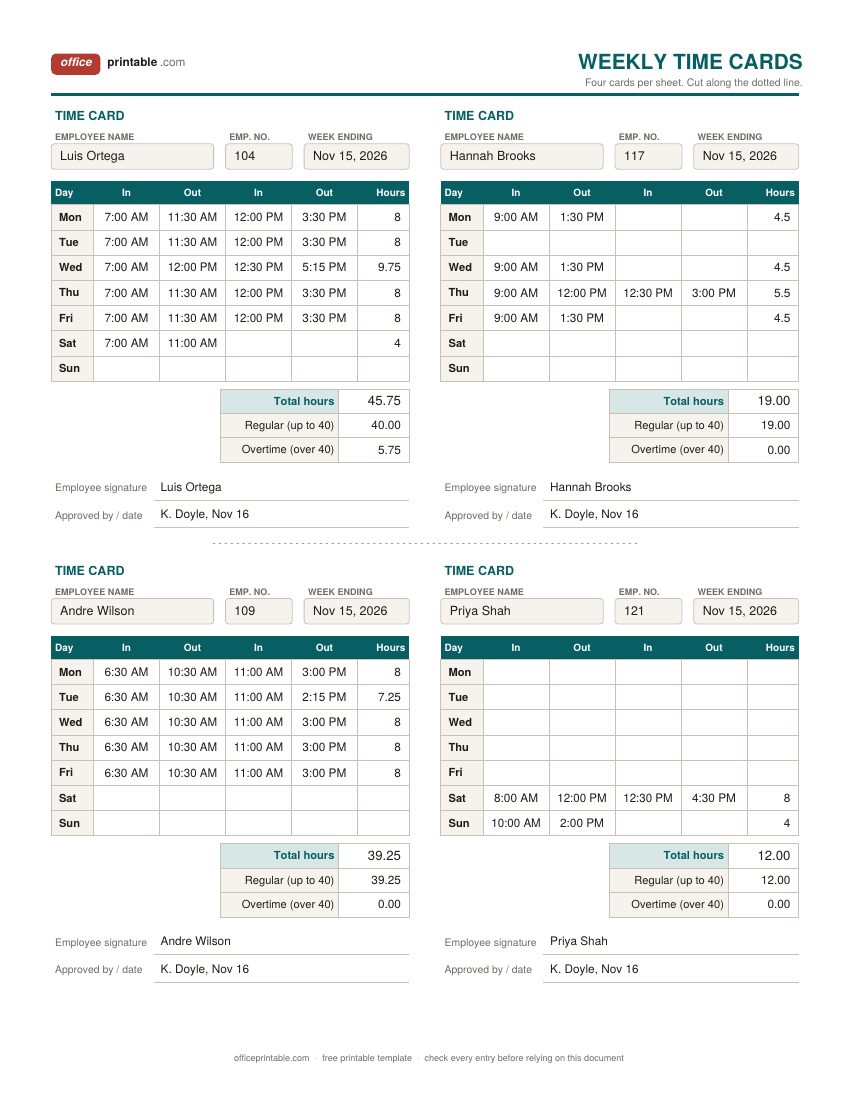
- Employee name, number and week ending
- Who the card belongs to and which week or pay period it covers. Write the last day of the workweek in Week ending so cards from different weeks never get mixed up in the rack.
- In, Out, In, Out
- The first pair is the start of the shift and the start of the meal break. The second pair is the return from the break and the end of the shift. No meal break that day? Fill in the first In and Out only.
- Daily hours
- Time between each In and its Out, added together. The Excel version does this for you once the times are typed in.
- Regular and overtime hours
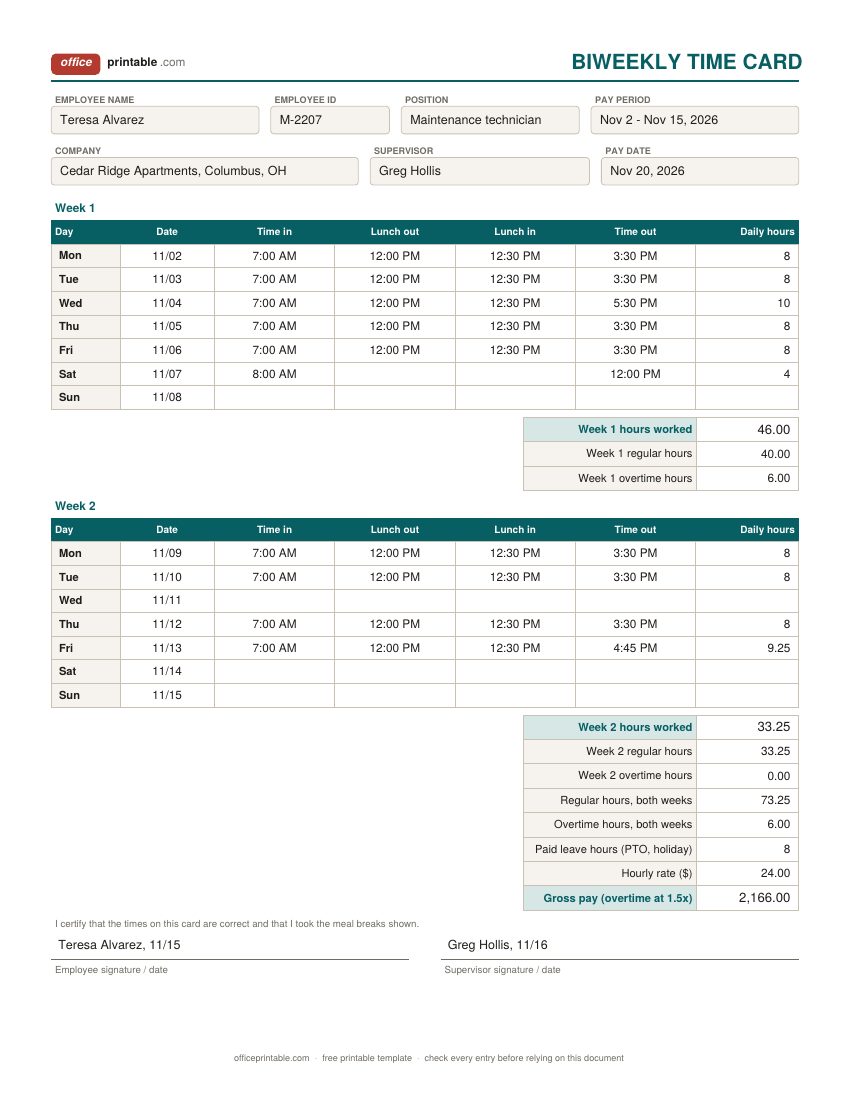
- Up to 40 hours in the workweek is regular time and anything above 40 is overtime under the federal rule. The biweekly card splits each week separately.
- Paid leave hours
- PTO, holiday or sick hours that are paid but not worked. They are paid at the normal rate and do not count toward the 40 hours.
- Hourly rate and gross pay
- On the biweekly and monthly cards, type the rate and the Excel file works out pay before taxes and deductions.
- Signatures
- The employee confirms the times and the supervisor approves the card before payroll runs.
Time card or timesheet: which one do you need?
People use the two words for the same thing, but in most workplaces they are different pieces of paper. An employee time card belongs to one person. It sits in a rack next to a time clock or on a clipboard at the front desk, and the employee writes or stamps the time each time they come and go. A timesheet is usually a bigger sheet that the employee fills in at the end of the day or week, often with project codes, leave columns and notes.
Pick a time card if staff clock in at a fixed spot, if you want the times recorded as they happen, or if a manager checks cards at the end of each shift. Pick a timesheet if people work from different places, split time across jobs or fill in hours from a calendar.
Which time card template to use
The weekly punch time card is the classic. Four cards print on one sheet of paper, so a crew of twelve needs three sheets a week. Each card has two In and Out pairs a day which covers a shift with one unpaid lunch. It fits small shops, restaurants, landscaping crews and warehouses where people start and finish at the same door.
The biweekly time card suits businesses that pay every two weeks. It keeps the two workweeks apart on purpose, because federal overtime is worked out one workweek at a time. You can't add up 80 hours over two weeks and call nothing overtime when one week had 46 hours. It also has room for paid holiday or PTO hours and the hourly rate, so the card hands payroll a gross pay figure.
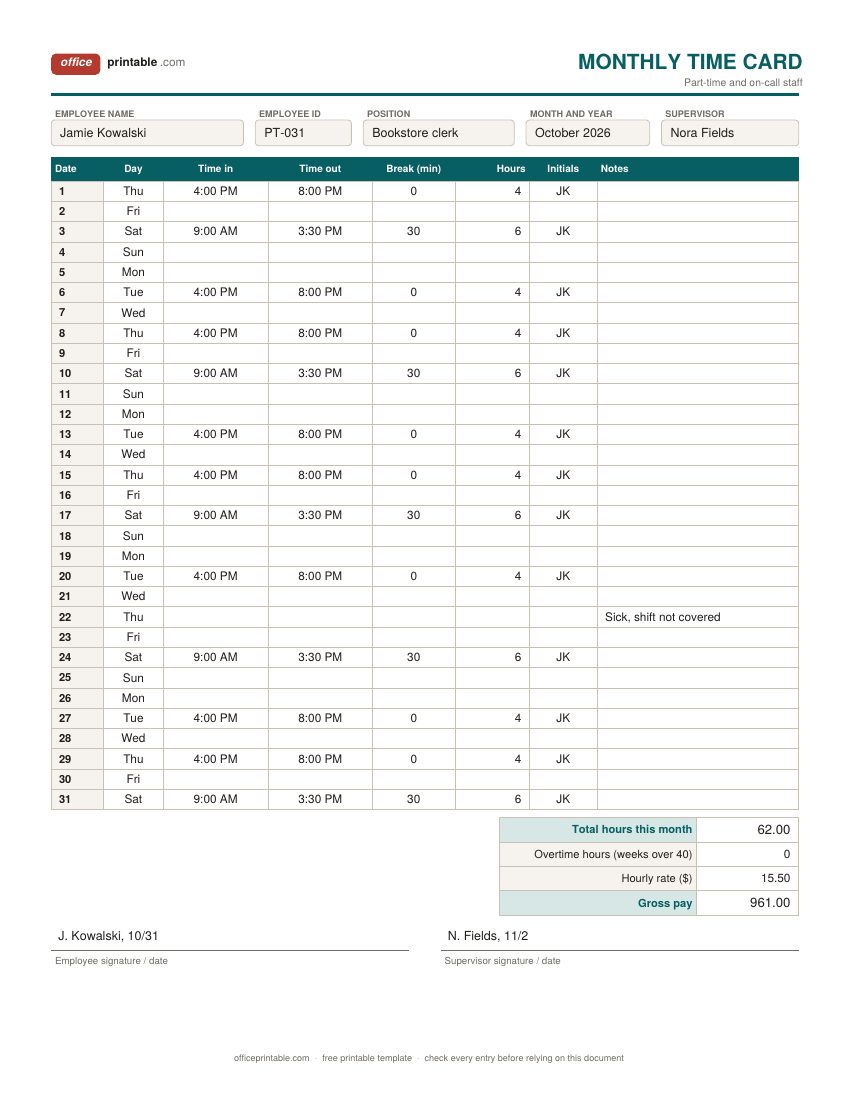
The monthly time card for part-time staff lists every date of the month on one page. Someone who works three or four short shifts a week fills in only the days they worked and initials each line. It is a good fit for student workers, weekend staff, on-call help and seasonal hires.
How to fill out a time card
- Write the employee name, number and the week ending date (or the pay period) before the card goes in the rack.
- Each day, write the time in on arrival, the time out when the meal break starts, the time in when it ends and the time out at the end of the shift. Use AM and PM, or 24-hour time, so 7:00 never gets read as evening.
- Work out the daily hours. From 7:00 AM to 11:30 AM is 4.5 hours, and 12:00 PM to 3:30 PM is 3.5 hours, so the day is 8 hours.
- At the end of the week add the daily hours. Up to 40 is regular time and the rest is overtime.
- The employee signs to confirm the times. The supervisor checks the card, initials any corrections and signs it off.
- Send the cards to payroll before the cutoff on your payroll calendar, then file them.
Minutes are easier to add up in hundredths of an hour. 15 minutes is 0.25, 30 minutes is 0.5 and 45 minutes is 0.75. For odd minutes, divide by 60 (20 minutes is 0.33).
Overtime on a time card
Under the federal Fair Labor Standards Act, non-exempt employees get at least one and a half times their regular rate for hours worked over 40 in a workweek. A workweek is any fixed run of seven days in a row that you set, such as Sunday through Saturday. It does not have to match the calendar week, but it can't be shifted around to dodge overtime, and the US Department of Labor does not allow averaging hours over two or more weeks.
Weekend and holiday work doesn't earn overtime under the federal rule by itself; those hours simply count toward the 40. Paid time off that wasn't worked, such as a paid holiday, doesn't count toward the 40. Some states, California among them, also count daily overtime, so a 10-hour day can earn overtime there even in a short week. Check your state's labor department before you rely on the regular and overtime split these cards show. The weekly and biweekly Excel cards use the 40-hour weekly rule and a 1.5 multiplier, and you can change the formulas if your state needs more. On the monthly card you type any overtime hours yourself.
Meal breaks, short breaks and rounding
Federal law doesn't require a meal break, but many states do. When a break is given, the US Department of Labor says short rest breaks of about 5 to 20 minutes are normally paid work time. A real meal break, typically 30 minutes or more with the employee fully relieved of duty, does not have to be paid. That's why these cards record the lunch out and lunch in times and leave short coffee breaks inside the working hours.
Many time clocks round punches to the nearest 5 minutes, the nearest tenth of an hour (6 minutes) or the nearest quarter hour. Federal rules accept this as long as it evens out over time and doesn't end up shorting employees for time they actually worked. Round both ways, or don't round at all and write the real time.
How long to keep time cards
The FLSA does not ask for any particular form, but it does ask employers to record the hours worked each day and the total for each workweek. Payroll records should be kept for at least three years, and the time cards behind them for at least two years. Some states ask for longer, so many businesses simply keep every card for three or four years.
File each week's cards together under the week ending date, next to the payroll register and a copy of each pay stub. If a card has a mistake, cross it out with one line, write the right time next to it and have the supervisor and employee both initial it. Never redo a card from scratch after it was signed.
Using the Excel, Word and PDF time cards
The Excel time card works out hours for you. Type a clock time such as 7:00 AM or 15:30 into each box and the hours column fills itself in. Overnight shifts work too: 10:00 PM to 6:00 AM comes out as 8 hours. Leave a box empty and that pair is skipped. If you type a time without AM or PM, Excel reads it as morning, so 3:30 means 3:30 AM. The cell shows AM or PM so a slip is easy to spot.
The fillable PDF holds what you type and prints cleanly, but it doesn't do any math. The Word file is the one to change if you want your business name on the card or a different column. The ODT and ODS copies open in LibreOffice and Google Docs or Sheets.
Need the planned shifts as well as the actual times? Plan the week in the employee schedule template and compare it with the cards. To see sick days, late arrivals and absences across the month, log them in the employee attendance tracker.
Questions
Is this time card template free?
Yes. Download any design in any format, print as many cards as you need and use them in your business. There's no sign-up.
How do I calculate hours on a time card?
Subtract the time in from the time out for each pair, add the pairs for the day and turn leftover minutes into hundredths (30 minutes is 0.5). For example, 7:00 AM to 11:30 AM plus 12:00 PM to 3:30 PM is 4.5 plus 3.5, so 8 hours. The Excel version does this for you.
Does the time card work out overtime?
The weekly and biweekly Excel cards do. They count hours over 40 in each workweek as overtime, and the biweekly card pays them at 1.5 times the rate. On the monthly card you enter overtime hours yourself. Some states, California among them, also have daily overtime, so check your state's rules and adjust the card if needed.
Can I use these cards with a time clock?
The weekly punch cards are sized for writing in times by hand, four to a sheet. Time clocks that print on cards usually need cards of a set size, so check your clock's manual before you feed these through one.
Do salaried employees need time cards?
Exempt salaried employees are not paid overtime, so federal law doesn't require their daily hours to be recorded. Salaried non-exempt staff are different, since they still earn overtime. Many businesses use time cards for everyone anyway, to track attendance and leave.
Comments and questions
Have a question about this template, or an idea to make it better? Leave a comment.
Leave a comment