What is on the page
- Days 1 to 31 and a weekday line
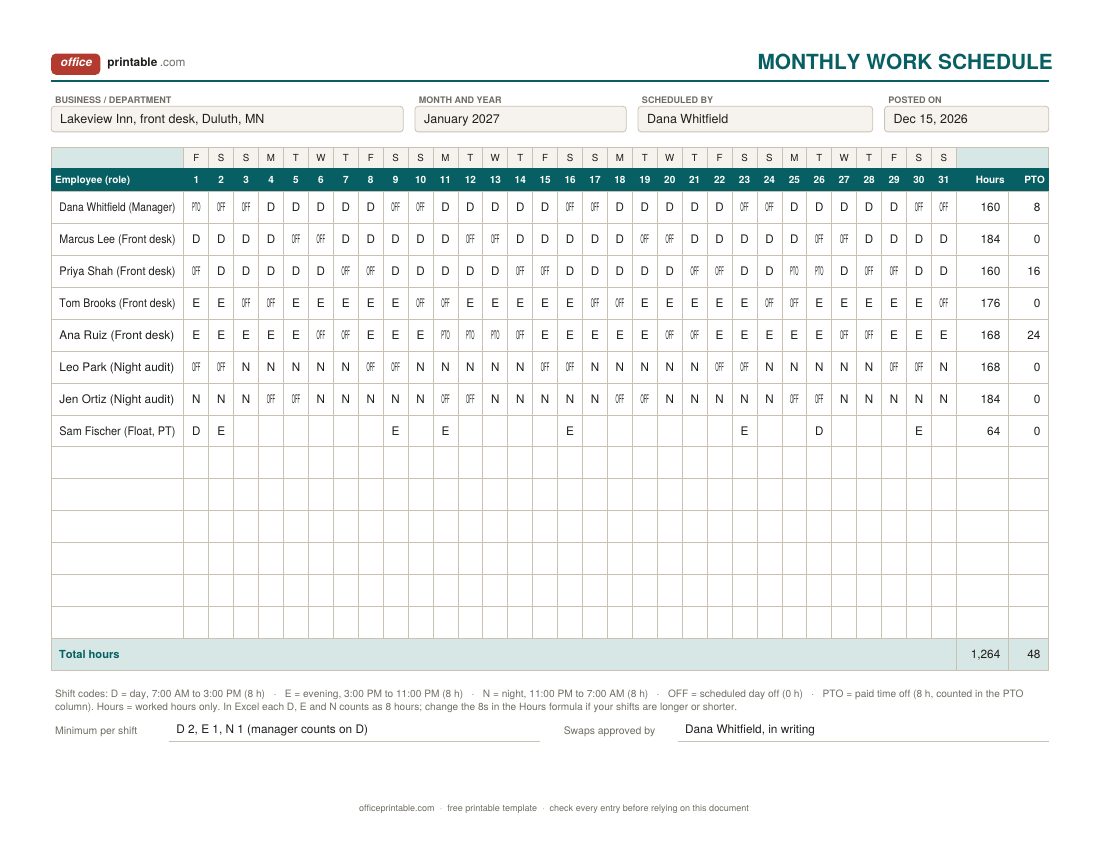
- The staff sheet is undated. Fill in the weekday letters across the top for the month you are scheduling, and cross out 29, 30 or 31 when the month is shorter.
- Shift codes and legend
- D, E, N, OFF and PTO, with the times and hours printed under the table. Change the times to match your business.
- Hours and PTO columns
- In Excel these add up on their own: 8 hours for each D, E or N and 8 PTO hours for each PTO day, with a total for the whole team.
- AM, PM and evening lines
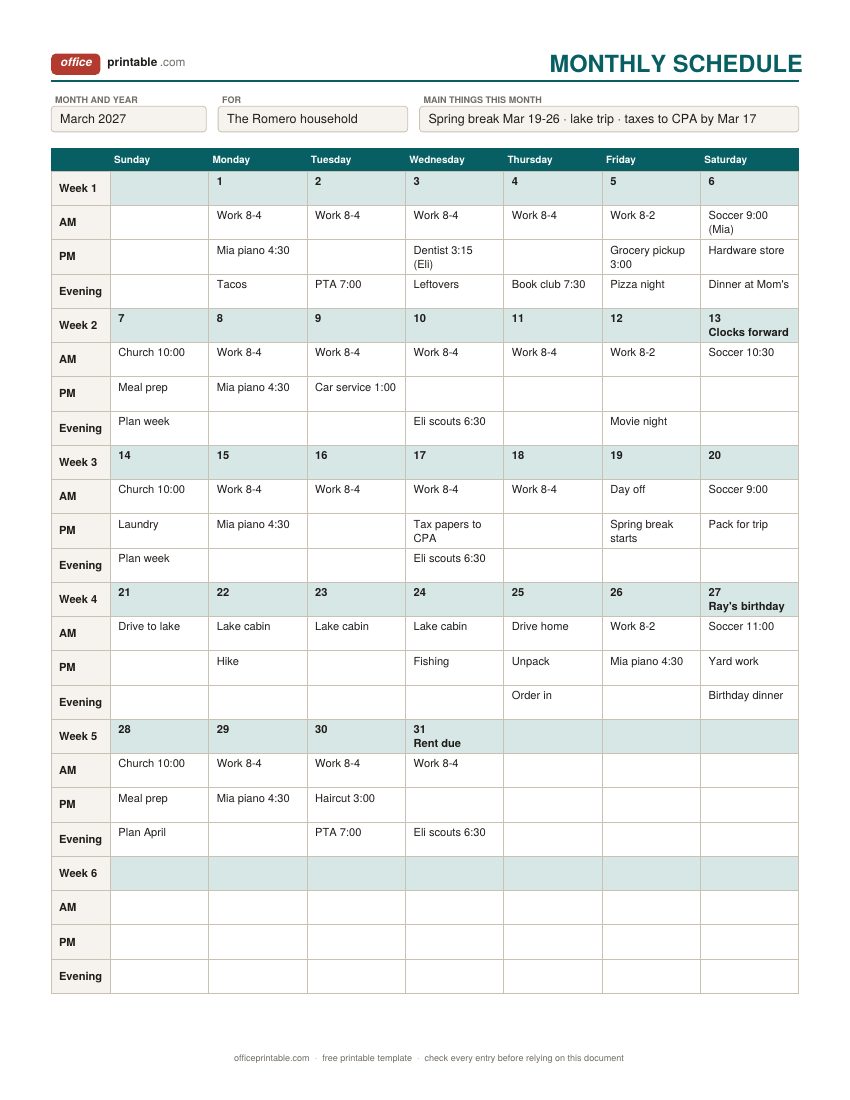
- On the monthly grid, each day has three lines under a shaded date line, so a busy day still fits.
- Primary, backup and phones
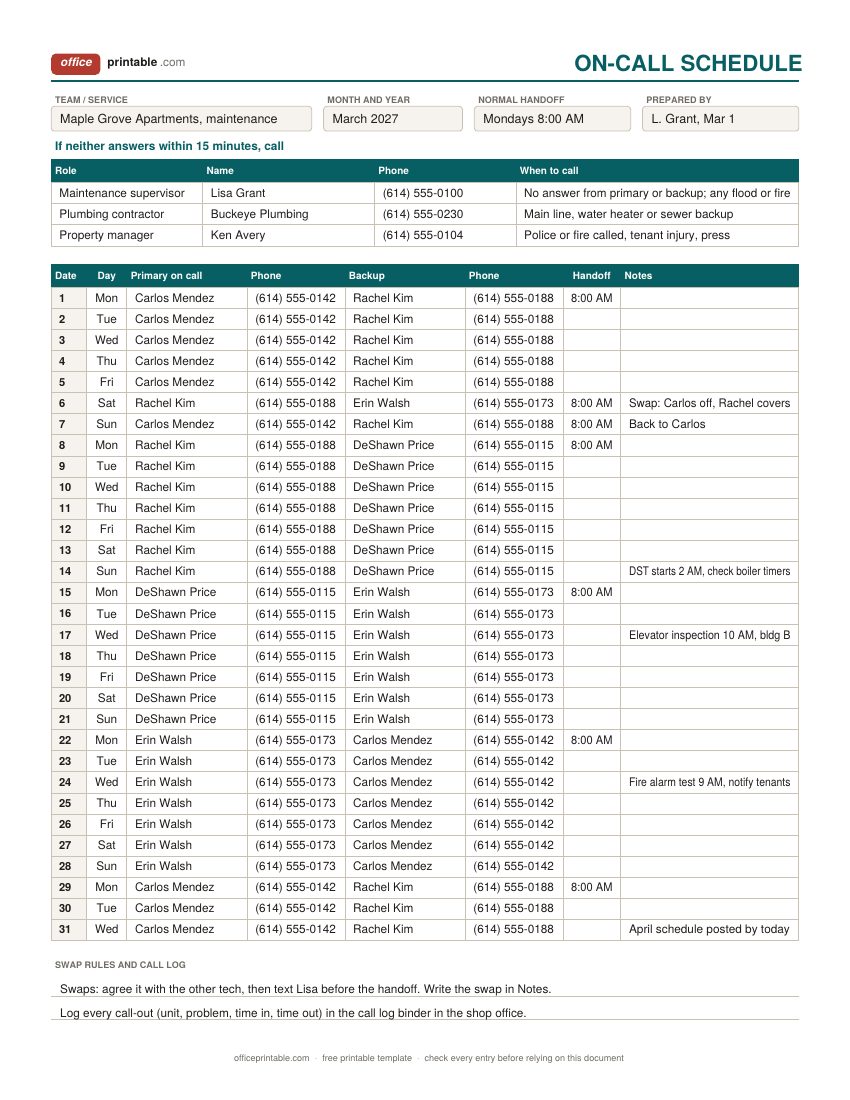
- On the on-call sheet, the person who takes the calls that day, the backup who steps in, and a number for each.
- Handoff time and escalation
- When the pager or phone passes to the next person, and who to call if nobody answers.
Which monthly schedule template to use
Pick by the question the sheet has to answer. If it's "who is working on the 14th?", use the monthly work schedule. It suits small teams that cover the same shifts every day: hotels, restaurants, clinics, group homes, security desks and call centers. If the question is "what is everyone doing this month?", use the undated grid. It reads like a calendar but gives each day a morning, afternoon and evening line, so school runs, appointments and work hours sit in the right part of the day. If the question is "who do I call at 2 AM?", use the on-call schedule.
These are different from a plain calendar. The monthly calendar pages are dated, for 2027 and 2028, and give each day one open box. That suits deadlines and holidays better than shifts. The monthly planner is for goals, tasks and a month-end review. A monthly schedule is about time and people: who works, on what shift, in what part of the day.
How to fill in the monthly work schedule
Start by writing the month at the top and the weekday letters across the weekday line. Shade or circle the weekend columns if that helps your team read it. Then work through it in this order:
- Mark approved time off first. Write PTO on those days, and OFF on any fixed days off, such as a part-timer who never works Mondays.
- Fill the hardest shifts next. Nights and weekends are usually the ones that go short, so give them to people who are available and spread them fairly.
- Fill the remaining day and evening shifts, then read down each column. Every date should meet the minimum you wrote at the bottom (for example two on days, one on evenings, one on nights).
- Check the Hours column. In Excel it updates as you type, so you can see straight away if someone is heading over 40 hours in a week or under the hours they were promised.
- Post it, and have one person approve all swaps.
In the sample, a small hotel front desk is scheduled for January 2027. The manager takes New Year's Day as PTO, a part-time float fills the gaps left by PTO and picks up Saturday evenings, and every date has at least two people on days, one on evenings and one night auditor. Full-timers land between 160 and 184 worked hours for the month which is about what five 8-hour shifts a week comes to over 31 days. Nobody goes over 40 hours in any Sunday to Saturday week.
Overtime is counted by the week, not the month
A monthly work schedule template makes it tempting to think in monthly totals, but federal overtime does not work that way. Under the Fair Labor Standards Act, non-exempt employees must get at least one and a half times their regular rate for hours over 40 in a workweek. A workweek is a fixed, repeating 168-hour period, and each one stands on its own: a 48-hour week can't be offset by a 32-hour week later in the month. Hospitals and residential care homes have one exception: by agreement with staff they can use a 14-day period, with overtime after 8 hours in a day or 80 in the period. So the Hours column tells you about the month, and you still need to check each week. A quick way is to put a pencil mark under the last day of each payroll week and count that person's codes in that stretch.
Some states add daily overtime or other rules, and a number of cities and states have "fair workweek" or predictive scheduling laws for retail, food service and hospitality. Those can require schedules to be posted days or weeks ahead, with extra pay for late changes. Rules differ by place and by industry, so check with your state labor department or an employment adviser before you settle on a posting habit. Track the hours people actually work on the timesheet template, since the schedule only shows the plan.
A monthly schedule for home and personal plans
The undated grid is the family and personal side of this page. Write the day numbers in the shaded date line, starting in the right weekday box, and use that same line for the one thing nobody should miss: a birthday, a rent date, the day the clocks change. Below it, put work hours or school on the AM line, activities and appointments on the PM line, and dinners, meetings and events on the evening line. There are six week rows because a 31-day month that starts on a Friday or Saturday, or a 30-day month that starts on a Saturday, spreads across six weeks. In shorter months, use the spare row for notes.
A monthly view is good for spotting crunch weeks early. If one week has a dentist visit, a school event and a late shift on the same day, you see it in March instead of finding out that morning. For the detail of a single week, copy that week onto the weekly schedule, and for an hour-by-hour plan of one day, use the daily schedule.
Running a monthly on-call and coverage schedule
On-call rotas are common in property maintenance, IT support, home health, utilities and small medical practices. Most teams rotate weekly with a fixed handoff time which is what the sample shows: four maintenance techs, a new primary each Monday at 8:00 AM, and next week's person as backup so they're already warmed up. Write the handoff time on the day it happens, record any swap in the notes, and keep the escalation strip short and current.
Pay rules for on-call time vary. Under federal rules, time an employee must spend on the premises, or so close by that they can't use it for their own purposes, generally counts as hours worked. Time at home with a phone, free to sleep, run errands or see friends, usually does not, though calls taken and trips out do. State law, union contracts and company policy can add to this, so check with your HR adviser or state labor department. Log each call-out and the time spent on it so payroll has the real hours.
Editing the Word and Excel files
The PDFs are fillable on screen and print on one Letter or A4 page each. In Word you can rename the codes, add a role column, or change AM, PM and evening to other labels. In the Excel staff schedule, the Hours and PTO cells hold formulas that count the codes in each row; type codes exactly as shown (upper or lower case both work). If your team works 10- or 12-hour shifts, change the 8 next to that code in the formula and copy it down the column. Save a master copy with your staff names, then copy it for each new month. For a weekly staff schedule with start and finish times, and labor cost, see the employee schedule template. For 24/7 crews on a fixed 2-2-3 pattern, use the shift schedule template instead.
Questions
How do I make a monthly work schedule?
Write the month and weekdays across the top, mark approved time off, fill the night and weekend shifts first, then the rest. Check each day meets your minimum staffing, check each person's weekly hours, and post it before the month starts.
What do the shift codes D, E and N mean?
D is a day shift, E an evening shift and N a night shift. OFF is a scheduled day off and PTO is paid time off. The times printed in the legend are an example; change them to your own.
Does the monthly schedule calculate hours?
Yes, in Excel. Each D, E or N counts as 8 worked hours and each PTO day as 8 PTO hours, with team totals at the bottom. The PDF and Word versions have the same columns to fill in by hand.
Can I use the monthly schedule for any month?
Yes. None of these designs are tied to a year. The staff sheet runs from day 1 to 31 and the grid has six week rows, so any month fits.
How far ahead should a work schedule be posted?
Many employers post two weeks or a month ahead. Some cities and states require advance notice for certain industries, so check the rules where you operate.
Is on-call time paid?
It depends on how restricted the person is. Waiting on the premises usually counts as work; being reachable at home usually doesn't, apart from the calls taken. Check federal, state and contract rules for your situation.
Comments and questions
Have a question about this template, or an idea to make it better? Leave a comment.
Leave a comment