What is on the page
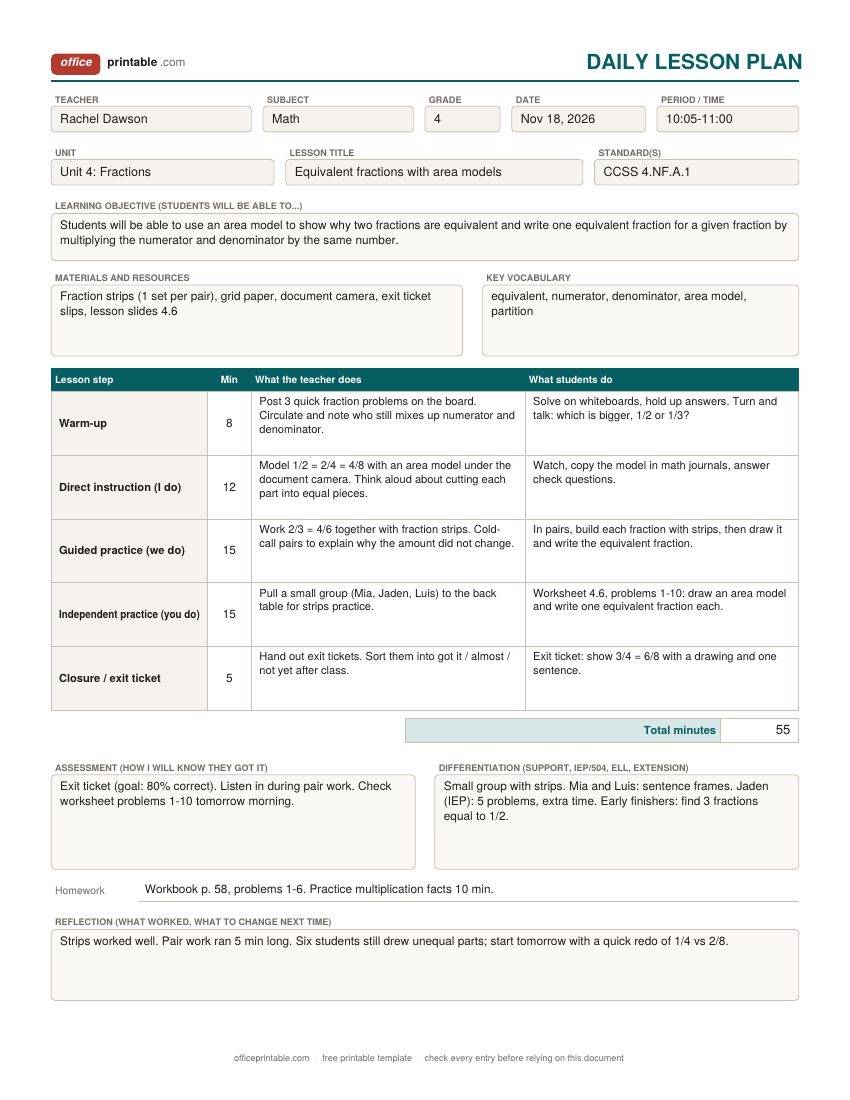
- Teacher, subject, grade and date
- The basics a principal or substitute needs to match the plan to a class. Add the period or time block so the plan makes sense on a rotating schedule.
- Unit and standard
- Write the unit name and the standard code your state or district uses, such as CCSS 4.NF.A.1 for fourth grade fractions. One or two standards per lesson is plenty.
- Learning objective
- One sentence about what students will be able to do by the end of the lesson. Start it with a verb you can see or hear: explain, solve, compare, write.
- Materials and vocabulary
- Everything you need to pull out or copy before the bell, and the few words students must know to follow the lesson.
- Lesson steps and minutes
- Warm-up, direct instruction, guided practice, independent practice and closure, with the minutes for each and what you and the students do. The Excel copy adds up the minutes so you can check them against the period.
- Assessment
- How you will know who learned it: an exit ticket, a quick check, a worksheet, a question you listen for during pair work.
- Differentiation
- Supports for students who need them (IEP and 504 accommodations, English learners, a small group) and a stretch task for early finishers.
- Homework and reflection
- The assignment, if there is one, and two or three lines after the lesson on what worked and what you would change.
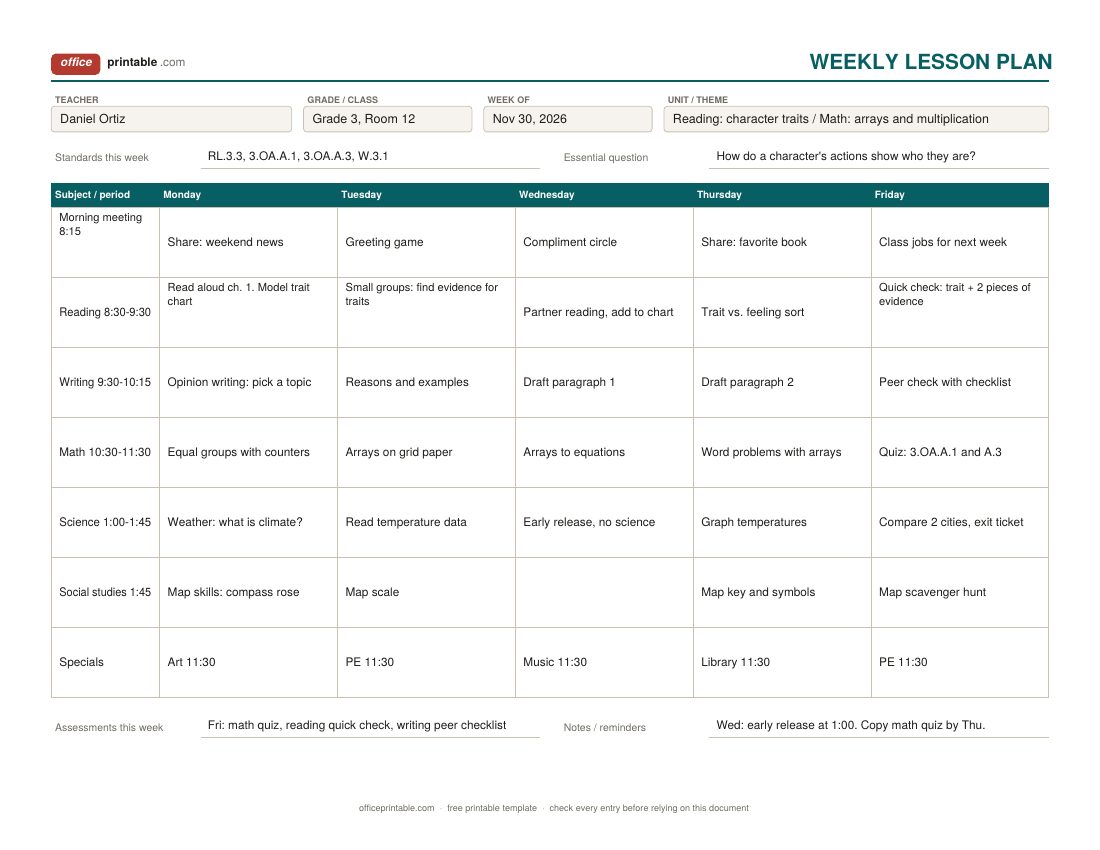
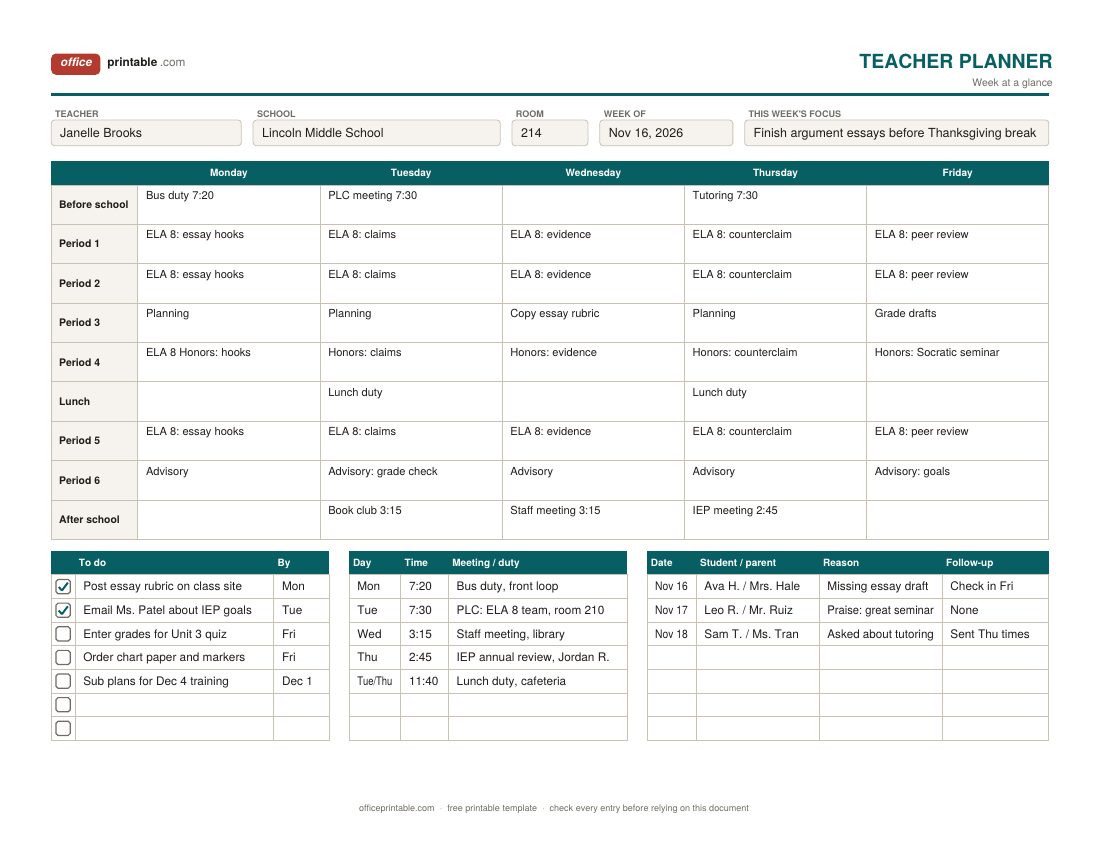
- Weekly grid and planner extras
- The weekly lesson plan has a row per subject or period and a cell per day. The teacher planner page adds duties, meetings, a to-do list and a parent contact log.
What a good lesson plan template covers
Ask ten teachers what a lesson plan should hold and the answers overlap more than you would expect. Nearly every format asks for an objective, the standard it ties to, materials, the steps of the lesson, how you'll check understanding, and how you will adjust for students who need more or less. The daily lesson plan here follows that order, so it fits most district formats without much editing.
Where formats differ is in the steps. Some schools still use a version of Madeline Hunter's lesson design (anticipatory set, input, modeling, guided practice, checking for understanding, independent practice, closure). Others ask for "I do, we do, you do." The step names in the table cover both, and you can rename them in Word if your school has its own labels.
Writing an objective you can actually check
The objective is the line that holds the rest of the plan together, and it's also the line most often written in a hurry. "Students will understand fractions" is hard to check. "Students will use an area model to show that two fractions are equivalent" tells you what to teach, what to watch for, and what the exit ticket should ask.
A simple test: could a visitor walk in at minute 40 and see whether students are doing it? If yes, the objective is clear enough. Many teachers plan backward from there, an idea known as backward design from Wiggins and McTighe's Understanding by Design: decide the result, decide the evidence, then plan the activities. In practice that means writing the objective and the exit ticket first and filling in the middle last.
Planning the steps: I do, we do, you do
The middle of the daily plan is built on what is often called the gradual release of responsibility, a term P. David Pearson and Margaret Gallagher introduced in 1983. You show it, you do it together, then students do it on their own. The table has a row for each of those moves plus a warm-up and a closure.
Fill in the minutes column as you go. It's easy to plan 70 minutes of activity for a 55-minute period, and the total at the bottom catches that before the lesson does. In the Excel copy the total updates as you type. Keep direct instruction short, especially in the lower grades, and give guided practice the most time, since that's where you find out who is lost.
The two columns, "what the teacher does" and "what students do", are worth keeping seperate. If the students column is mostly "listen" and "watch", the lesson probably needs another activity.
Weekly lesson plan template: one week on one page
Many schools ask teachers to turn in or post a weekly lesson plan rather than a daily one. The weekly design puts Monday to Friday across the top and up to seven rows down the side. Elementary teachers usually label the rows by subject (reading, writing, math, science, social studies, specials). Middle and high school teachers can label them by period instead and write the class in each row.
Each cell holds a line or two: the activity and, if you like, the page or worksheet. That's enough for a principal walking through, and enough for you to see at a glance that Friday has three assessments stacked on top of each other. The standards line and essential question at the top cover what many admin checklists look for. For a student version of the same idea, the homework planner lays out assignments by subject and day.
Using the teacher planner page
A lesson plan covers what you teach. A teacher planner covers the rest of the week: bus duty, PLC meetings, an IEP review at 2:45, the grades due Friday. The teacher planner page puts all of that in one grid, with before school, each period, lunch and after school down the side.
Underneath are three small lists. The to-do list has checkboxes and a "by" column. Meetings and duties keeps the times in one place. The parent contact log records the date, the student and parent, the reason and any follow-up, which is useful when a question comes up at conferences months later. Keep the filled sheets in a binder and you have a record of the whole year. If you're setting up a classroom, the teacher supply checklist covers what to buy before the first day.
Daily, weekly or planner page: which to print
- Daily lesson plan: for a formal observation, a new unit, student teaching, or any lesson you want to think through step by step. It's also the right thing to leave for a substitute.
- Weekly lesson plan: for routine weeks and for schools that collect plans on Friday for the next week.
- Teacher planner page: for running your own week. Many teachers print it alongside the weekly plan and keep both on a clipboard.
A general weekly planner may suit a teacher's personal week better, and the class schedule is the student-facing version of a period timetable.
Standards, IEPs and school rules
Standard codes depend on where you teach. Many states use the Common Core codes for math and English (4.NF.A.1, RL.3.3) and the NGSS for science, but several states have their own standards with their own numbering. Use whatever your district's curriculum guide uses, and check with your principal or instructional coach about what a submitted plan must include.
The differentiation box is for notes on how you'll deliver the lesson. It's not a place for private details. Keep student information to first names or initials, as in the sample, and follow your school's rules on what may sit in a plan that substitutes and visitors can see. Accommodations themselves come from each student's IEP or 504 plan, so check the plan rather than going from memory.
Editing the Word and Excel files
The PDFs are fillable. Type into them and save, or print a stack and fill them in by hand. In Word every section is a table, so you can rename the steps, add a row for a second standard, or change the weekly rows to periods 1 to 7. In Excel the daily plan adds up the minutes for you, and the weekly grid is easy to copy into a new tab for each week of the term. Other school forms are in the education templates section, and personal pages are under planners. Students preparing for tests can use the study schedule.
Questions
What should a lesson plan include?
An objective, the standard it covers, materials, the steps of the lesson with rough timing, how you'll check understanding, and how you'll support students who need it. A homework line and a short reflection are useful extras.
How long should a lesson plan be?
One page is enough for most lessons. Formal observations and student teaching often call for more detail, so check what your principal or university supervisor expects.
What is the difference between a daily and a weekly lesson plan?
A daily plan walks through one lesson step by step. A weekly lesson plan gives a line or two per subject or period for each day of the week, which is the format many schools collect.
Can I use the lesson plan template for a substitute?
Yes. The daily plan has the period, materials, steps and timing a sub needs. Add the seating chart location, the names of a helpful student and a nearby teacher, and the bell schedule.
Are the templates dated?
No. Write the date or week at the top, so they work for any school year.
Do the templates work for homeschool?
Yes. Use the subject rows on the weekly plan and skip the standards line if you don't follow a state framework.
Comments and questions
Have a question about this template, or an idea to make it better? Leave a comment.
Leave a comment