What is on the page
- Name, dates and area of life
- Every sheet has your name, the date you set the goal and a target date. The date set shows how long a goal has been waiting.
- Goal in one sentence
- On the SMART sheet the goal goes at the top in a single sentence. If you need two sentences, you probably have two goals.
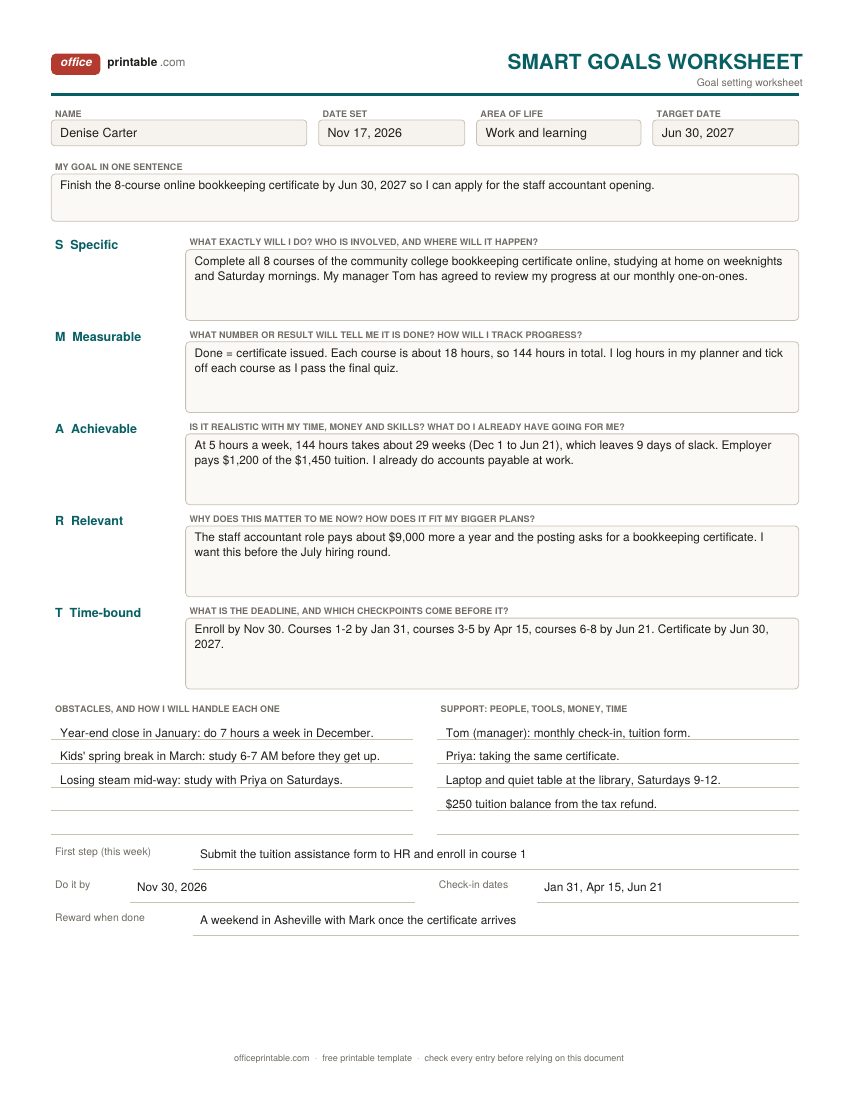
- SMART boxes with prompts
- Specific, Measurable, Achievable, Relevant and Time-bound each get a box with the question that letter should answer, so you fill in an answer and not just a word.
- Obstacles and support
- What is likely to get in the way and your plan for each, next to the people, tools, money and time you can lean on.
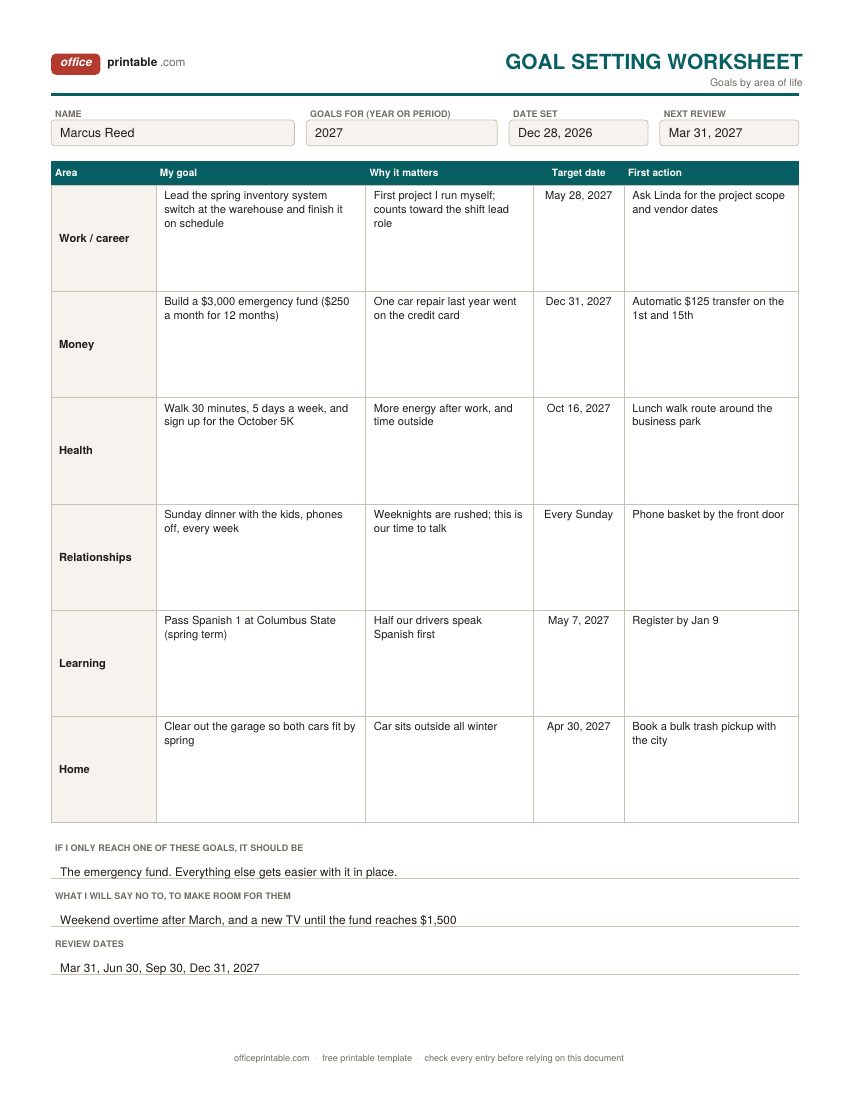
- Goals by life area
- Work or career, money, health, relationships, learning and home, each with the goal, why it matters, a target date and a first action.
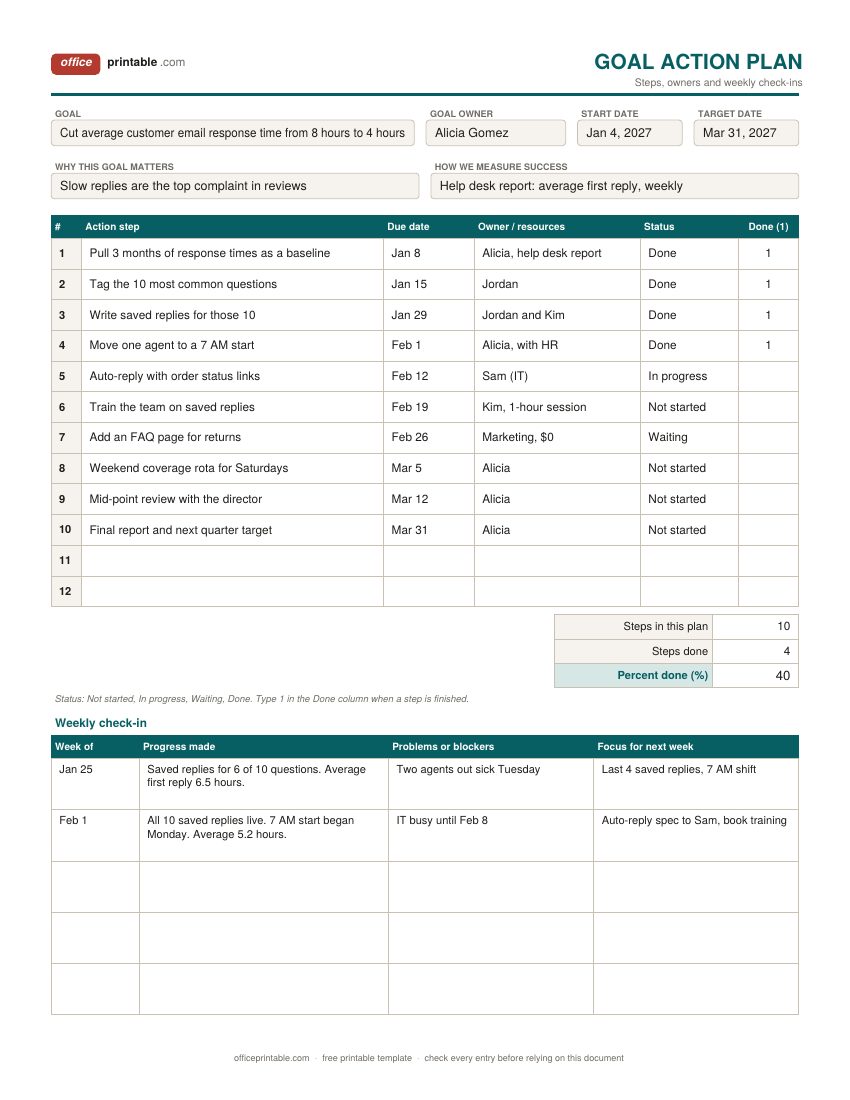
- Action steps with owners and status
- Twelve rows for steps, each with a due date, who does it or what it needs, and a status. Type 1 in the Done column when a step is finished.
- Weekly check-in
- Five rows on the action plan: the week, progress made, problems and the focus for next week.
How to use a goal setting worksheet
Start with the life-area sheet if you're setting goals for a new year or a fresh start and aren't sure what to focus on. Then look at the six goals together and pick the one or two that matter most right now. Push six goals at once and none of them gets much attention.
Take the goal you picked to the SMART goals worksheet and work it through, one box at a time. This is where a goal like "get my finances in order" turns into "save $3,000 by December 31 with a $125 transfer on the 1st and 15th of each month." Expect to rewrite the goal sentence at the top once or twice while you fill in the boxes. That's the worksheet doing its job.
When the goal has more than a handful of steps, or other people are involved, move it onto the goal action plan. List the steps, give each a due date and an owner, and check in once a week.
Writing SMART goals: what each letter asks
SMART is a simple checklist for writing a goal. Each letter is a test the goal has to pass before you start working on it.
- Specific. Say exactly what you will do. "Get healthier" isn't specific. "Walk 30 minutes at lunch, five days a week" is.
- Measurable. Decide what number or result tells you it's done, and how you'll track it along the way: dollars saved, courses passed, hours logged, a report you can pull.
- Achievable. Check the goal against your real week. Count the hours, the money and the skills it needs, and what you already have. A stretch is fine. A goal that needs 15 free hours a week when you only get 5 isn't.
- Relevant. Write down why this goal, and why now. This box is what keeps you going in week six, when the excitement has worn off.
- Time-bound. Give it a deadline and a few checkpoints before it. A deadline with no checkpoints tends to arrive as a surprise.
The letters haven't always stood for the same words. The idea is usually traced to a short 1981 article by George T. Doran in Management Review, where the A was Assignable and the R was Realistic. Today you'll mostly see Achievable and Relevant, and some versions use Attainable.
SMART goals template example
The filled-in example on the SMART goals worksheet shows a goal that started as "move up at work." It became "finish the 8-course online bookkeeping certificate by June 30, 2027." Then the Measurable box set the tracking: each course is about 18 hours, so the certificate takes around 144 hours. In the Achievable box, 144 hours at 5 hours a week comes to about 29 weeks. Starting December 1, that lands around June 21, with nine days to spare. A little arithmetic like this shows whether a goal is possible or only sounds good.
You can use the same pattern for a money, health or home goal. Put the number in Measurable, check it against your calendar in Achievable, and set two or three checkpoints in Time-bound.
Plan for obstacles before they show up
The obstacles box is the one most people skip, and probably the most useful one on the page. Write the two or three things most likely to knock you off course: a busy season at work, travel, a tight month for money, plain lack of energy. Then write what you'll do when each one happens, as a short if-then line. "If year-end close eats my weeknights, I study 7 hours a week in December instead of 5" is a plan you can follow on a bad day.
Psychologists call these if-then plans implementation intentions. A widely cited review of 94 studies (Gollwitzer and Sheeran, 2006) found that people who made them reached their goals more often than people who only set the goal. Name the situation and the action, and write both down.
Goal setting template for each area of life
The life-area design is useful at New Year, on a birthday or after a big change like a new job or a move. Setting one goal per area makes you look past the part of life that is loudest right now.
Fill in the "why it matters" column for every row. If you cannot think of a reason, cross the goal out, since it is probably something you feel you ought to do. Keep first actions small enough to do within a week. Then answer the two lines at the bottom: which goal matters most, and what you'll say no to so there's room for it. Set the review dates a quarter apart and put them in your yearly planner so they actually happen.
Goal action plan and weekly check-ins
A goal action plan is for goals with many moving parts or more than one person, such as a team target at work, a home project or a small business launch. Write each step as something one person could finish in a sitting or a few days. Put a due date and an owner on every line, and use the status column so anyone can see what is stuck.
The weekly check-in takes five minutes. Write what moved, what got in the way and the one or two things to focus on next week. If the same blocker appears two weeks running, change the plan instead of just writing it down again. For work goals that feed into a review, the performance review worksheet has a goals for next year section that you can fill in from this plan.
Goal setting worksheet or goal planner?
This page is for setting the goal and planning the first moves: thinking it through, choosing between goals and turning one into steps. Once a goal is set and you want to track it month by month, the goal planner has a milestone tracker with a progress bar and a monthly plan. Daily actions that build toward a goal fit better on a habit tracker, and the productivity planner helps you block out the time to do the steps. For a money goal with a calculated monthly amount, use the savings goal tracker.
Filling in the PDF, Word and Excel versions
The PDF is fillable, so you can type into every box and save it, or print it blank and write by hand. The Word version is laid out to print on one page per design, and you can change the prompts, add rows or put a team name at the top. In the Excel action plan, type 1 in the Done column for each finished step and enter how many steps the plan has. The sheet adds up the finished steps and shows the percent done. ODT and ODS copies open in LibreOffice and Google Docs.
Questions
What does SMART stand for in goal setting?
Specific, Measurable, Achievable, Relevant and Time-bound. Some versions use Attainable for the A or Realistic for the R. The worksheet asks the same practical question for each letter, whichever words you prefer.
How many goals should I set at once?
Fill in every area on the life-area sheet if you like, but put real effort behind one to three goals at a time. When one is done or running on habit, bring in the next.
Is a goal setting worksheet useful for students and employees?
Yes. Students can use the SMART sheet for a grade, a test score or an application deadline. Employees can use the action plan for a work target and bring it to one-on-ones or a performance review.
What is the difference between a goal and an action step?
A goal is the result you want, such as a $3,000 emergency fund. An action step is a task that moves you toward it, such as setting up an automatic transfer. Steps should be small enough to finish in a sitting or a few days.
How does the Excel action plan work out percent done?
Type the number of steps in your plan in the Steps in this plan cell and put a 1 in the Done column next to each finished step. Excel adds up the 1s and divides by the number of steps.
Can I use these worksheets with a group or team?
Yes. Share the Word or Excel action plan, give each step an owner and review it together at the weekly check-in.
Comments and questions
Have a question about this template, or an idea to make it better? Leave a comment.
Leave a comment